Stop Paying for Idle Test Infrastructure: On-Demand Azure VMs for QA
Last updated: 2026-10-07
Most QA teams pick between an expensive hosted grid that cannot reach your VNet or a 24/7 self-hosted runner pool that drifts and idles. Genta uses a third model: provision a clean Azure VM in your own tenant for the exact duration of each test run, then tear it down — and let anyone on the team author the tests in plain language.
The Two Bad Options Most QA Teams Settle For
If you have shopped for test automation infrastructure in the last five years, you have probably been pushed into one of two uncomfortable choices.
Option A — Rent a hosted grid. Services like Sauce Labs, BrowserStack, or LambdaTest give you parallel browser sessions on someone else's machines. Great for cross-browser smoke tests. Painful the moment you need to hit an internal API behind a corporate VPN, test a Windows desktop app or installer, comply with a "data must not leave our tenant" policy, or drive a specific GPU, locale, or domain-joined machine. And you pay a flat per-session rate whether you ran 10,000 tests this month or zero.
Option B — Run your own self-hosted runner pool. Selenium Grid on a fleet of VMs, GitHub self-hosted runners, or a closet full of NUCs. The machines can reach anything — and now you own the operations. VMs billed 24/7 but busy maybe 8% of the day. Dependency drift. Patching, AV exclusions, secret rotation, the runner that mysteriously fails every Tuesday. Scaling for a release-day spike means provisioning a week in advance and leaving the capacity online.
Neither option is wrong. Both are expensive in a way QA leaders feel every month but can rarely justify on a line item.
A Third Option: Bring Your Own VMs, Anywhere
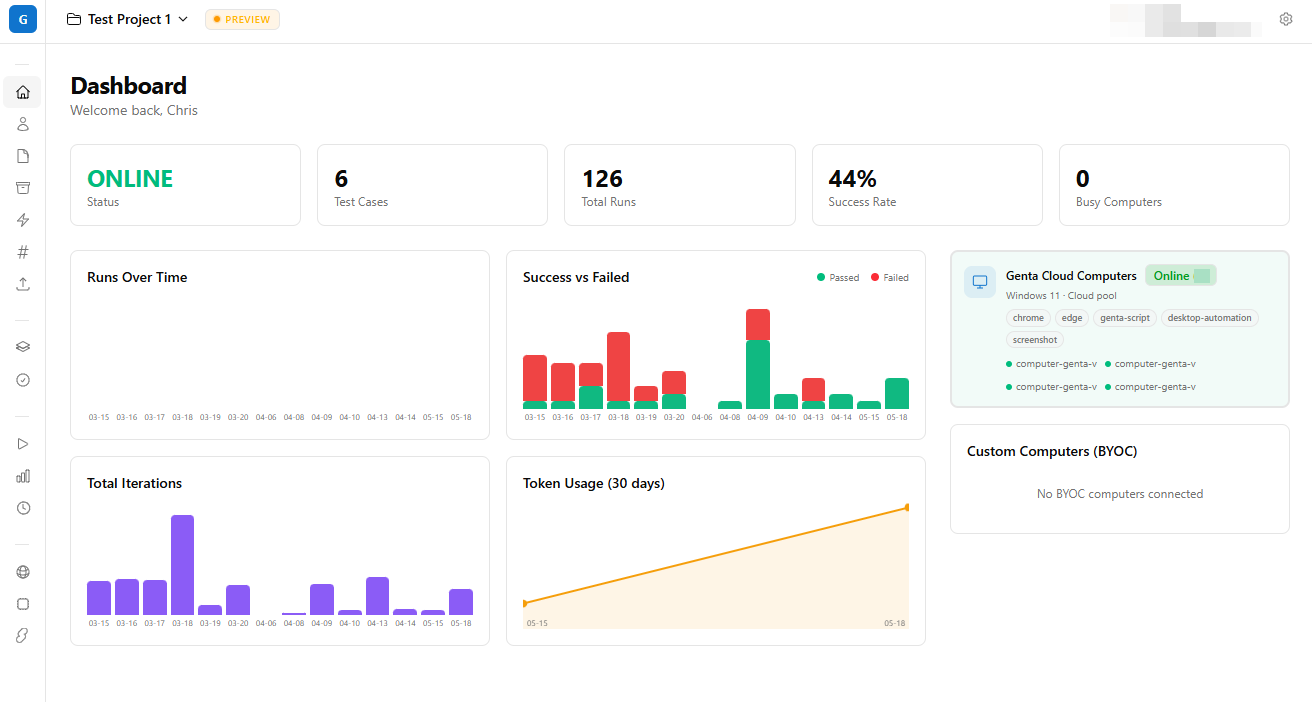
Genta is built on a different model. Instead of renting someone else's grid or babysitting a permanent pool, you point a Windows agent at the Genta orchestrator from any VM you control — a laptop under your desk, a VM in Azure, an EC2 instance in AWS, a GCP machine, an on-prem Hyper-V host, or anything in between.
The agent only needs outbound HTTPS to reach the orchestrator. No inbound ports. No VPN into your environment. No public IP on the runner. If the machine can browse the web, it can run tests.
The flow is straightforward:
- You install the lightweight Windows agent on whatever machine(s) you want to use — local, Azure, AWS, GCP, on-prem, all of the above.
- The agent dials out to the Genta orchestrator, authenticates, and waits for work.
- A test run kicks off — manually, via webhook, or on a schedule — and the orchestrator assigns the test plan to an available agent.
- The agent executes the test locally on its machine, with full access to whatever that machine can reach (your VNet, your VPC, your domain controller, your localhost dev build).
- Results, logs, screenshots, and artifacts stream back to the orchestrator in real time.
Because the agent talks out to the orchestrator rather than the other way around, the runner can sit anywhere your security team is willing to host it — including environments that block all inbound traffic.
Ephemeral When You Want, Persistent When You Don't
The same agent model supports two very different operating styles, and most teams blend them:
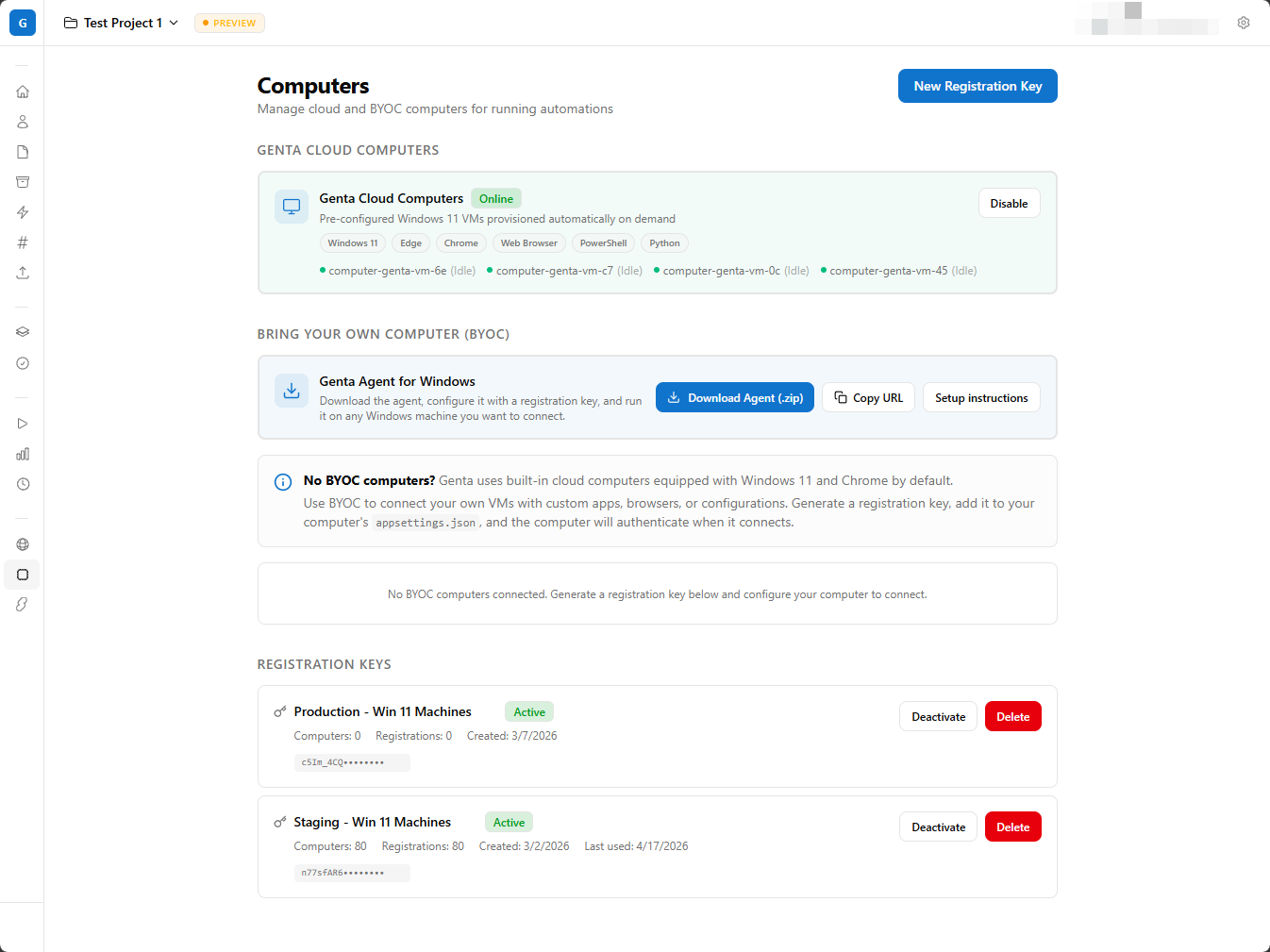
- Ephemeral runners — spin up a fresh VM (in your Azure subscription, your AWS account, or any cloud), let the agent register, run the suite, then tear the VM down. Clean state every time, costs scale with usage.
- Persistent runners — keep an agent installed on a long-lived box (a build server, a developer laptop, a small on-prem fleet). Zero provisioning latency, useful when you need a specific machine identity, GPU, or locked-down corporate image.
For teams already in Azure, Genta can drive the ephemeral lifecycle for you — provision a VM via the Azure Resource Manager APIs, wait for the agent to check in, run, then deprovision. For AWS, GCP, or your own datacenter, you bring the orchestration (Terraform, an autoscaling group, a scheduled script) and Genta just consumes whatever agents check in.
You Don't Need Selenium Skills to Drive It
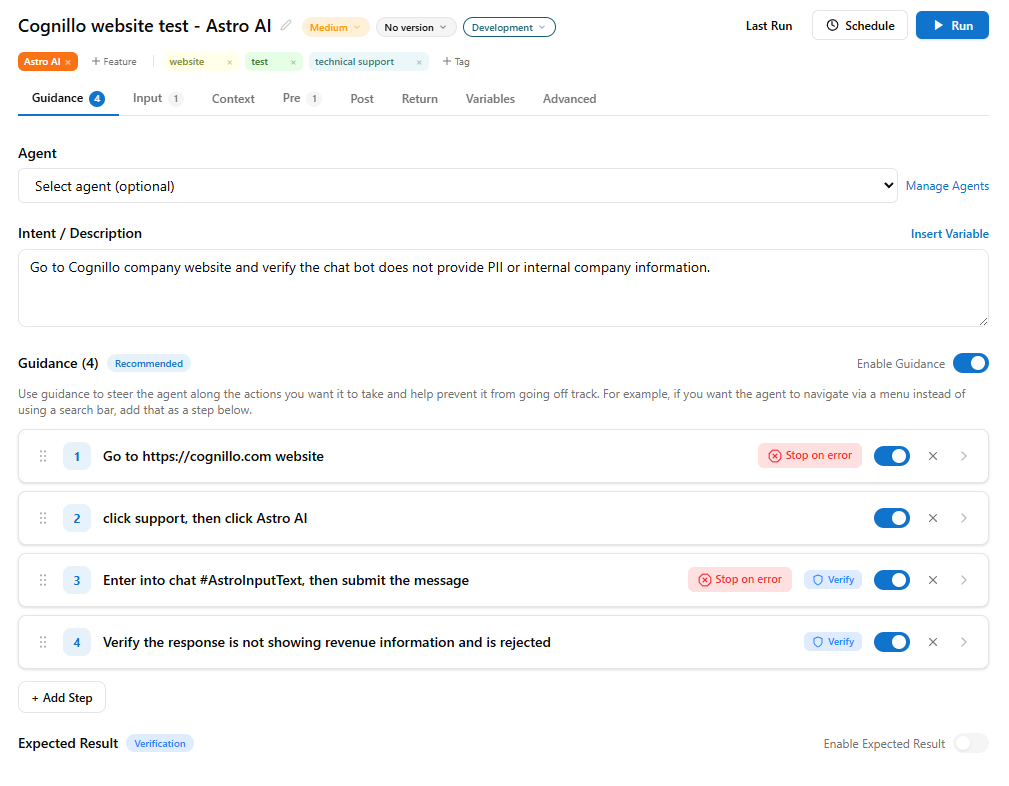
The other half of the story is who actually authors the tests. Traditional automation assumes a tester who can write Selenium, WebDriver, or Playwright code, wire up page objects, and debug flaky CSS selectors. Most QA teams do not have that bandwidth, and most product teams should not need it.
Genta lets you describe what the test should do in plain language and vibe test your application — point it at a URL or a Windows app, describe the scenario, and let Genta drive the interactions, take the screenshots, and verify the outcomes. No grid configuration. No driver binaries. No coding skills required from the person writing the test.
Engineering still gets full control when they want it — but a product manager, support lead, or QA analyst can author a real, repeatable test in the time it used to take to schedule a meeting about writing one.
The Cost Math, With Real Numbers
Consider a mid-size team running roughly 200 test runs per day, average run duration 8 minutes, on a Standard_D4s_v5 (4 vCPU / 16 GB) Windows VM. The same math applies to a comparable AWS m6i.xlarge or a GCP n2-standard-4.
Self-hosted pool, sized for peak:
- 8 VMs running 24/7 to absorb release-day concurrency
- ~$140/month per VM compute + ~$10/month disk = ~$150/VM
- ~$1,200/month, used less than 10% of the time
- Plus an estimated 8 hours/month of ops toil keeping the fleet clean
On-demand provisioning (Genta model):
- 200 runs × 8 min = 1,600 VM-minutes/day ≈ 800 VM-hours/month
- At ~$0.19/hour for
D4s_v5Windows = ~$152/month - Add provisioning overhead and storage = roughly ~$200/month all-in
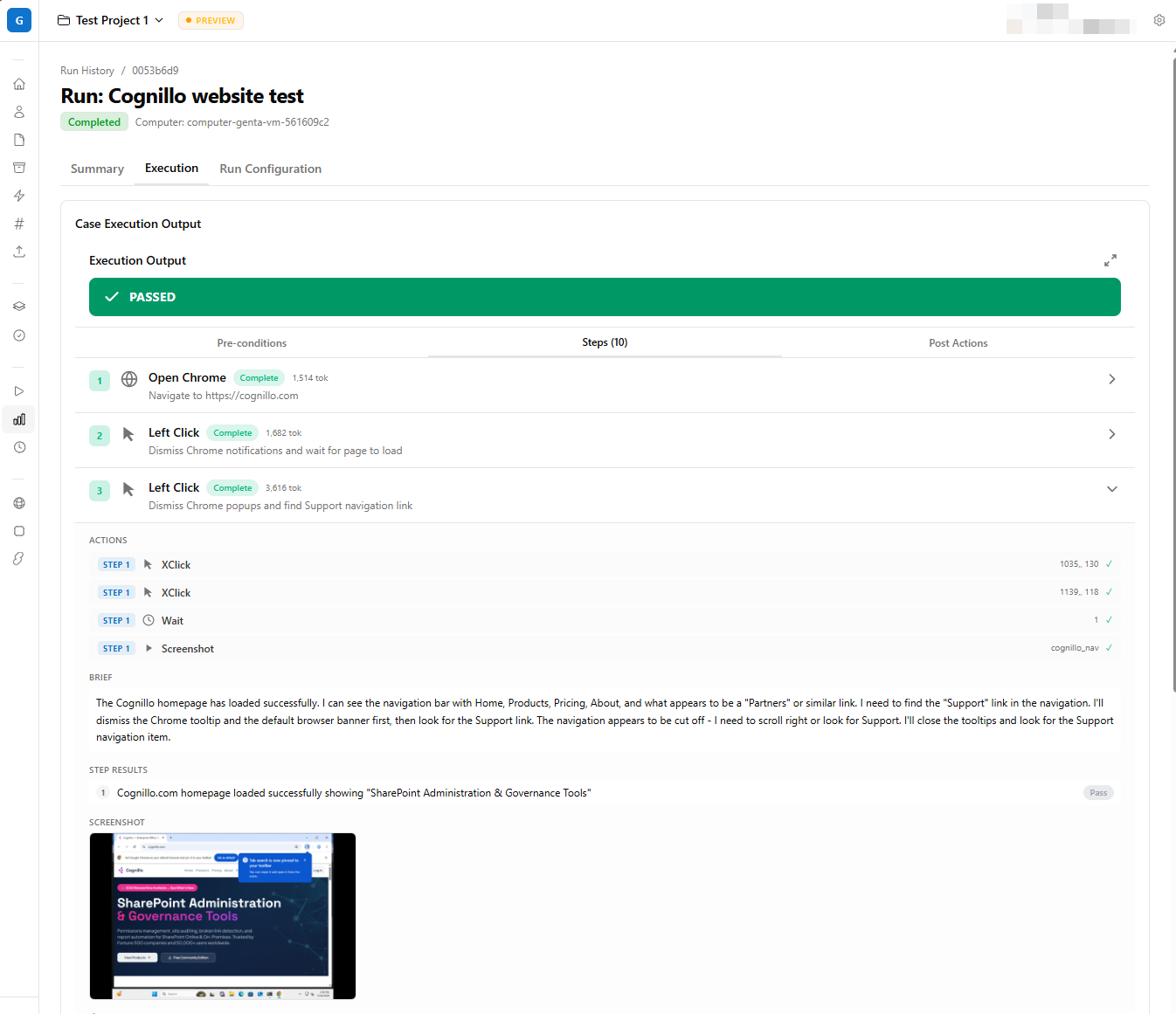
That is roughly an 85% reduction in infrastructure spend for the same workload — before you count the ops time you stop spending on runner hygiene. And critically, the cost scales with usage, not with capacity. Quiet week? You pay less. Big release? You pay more, but only for the minutes you actually consumed.
The hosted-grid comparison is harder because those vendors price by parallel session, but a typical 5-session plan starts around $1,500–$2,500/month — and you still cannot reach your VNet.
Why "Your VMs in Your Environment" Matters Beyond Cost
For a lot of teams, the cost story is the hook. The compliance story is the close.
When the VM lives in your environment — whatever cloud or datacenter that is:
- Your test traffic never leaves your tenant boundary.
- Existing VNet/VPC peering, private endpoints, security groups, and firewall rules all just work. The runner can hit your staging API on a private IP without exposing it to the public internet.
- Your existing cloud security stack (Azure Defender, AWS GuardDuty, GCP Security Command Center, your SIEM of choice) monitors it like any other workload.
- Tagging flows into your existing cost management and chargeback model — QA spend shows up as a tag, not a black-box vendor invoice.
- Data residency is whatever region you choose. No "where did our test screenshots actually get stored?" conversations.
For regulated industries — healthcare, finance, government contractors, anyone with an internal SOC — this is the difference between "we can use this tool" and "legal said no."
What You Stop Dealing With
Beyond the cost line, here is what disappears from your operational backlog when runners are ephemeral:
Dependency drift. Every run starts from a clean image. No "passes on runner-04, fails on runner-07" because runner-04 still has an old Edge build.
Leftover state. No stray processes, no residual files, no half-completed installer pinning a registry key. The whole machine is gone in 60 seconds.
Patching cadence. You patch the image, not the fleet. The next run picks up the new image automatically.
Secrets hygiene. Credentials are injected at runtime, used by a VM that exists for 8 minutes, then destroyed. No long-lived runner with cached tokens in a registry hive.
Capacity planning. Scaling is a config value, not a procurement cycle. Need 30 parallel runners for release-night regression? Raise the concurrency cap. Need 2 the next morning? It scales itself down — there is nothing to scale down, because the VMs only exist while running.
"But Spinning Up a VM Takes Too Long"
This is the most common objection, and it is fair. A naive az vm create or aws ec2 run-instances can take 3–5 minutes. That is unacceptable for a unit test and overkill for a 30-second smoke check.
A few things mitigate it in practice:
- The overhead amortizes over the run. For an 8-minute run, 60–90 seconds of provisioning is ~15% overhead. For a 45-minute nightly regression, it is noise.
- Pre-baked custom images. A managed image or AMI with your dependencies, browser, and agent already installed cuts boot-to-ready to under a minute.
- VM reuse within a run. One VM can execute a whole suite, not just a single case. Provisioning amortizes across hundreds of test cases.
- Persistent agents for the latency-sensitive case. If you really need sub-30-second start times for PR-gate tests, keep a few always-on agents (anywhere — a build server, a developer laptop, a small VM pool) and burst to ephemeral for everything else. Hybrid is fine.
The win is not that on-demand is faster than a hot runner — it is that on-demand is fast enough for 95% of workloads at a fraction of the cost.
What the Architecture Actually Looks Like
Stripped to its essentials:
- Orchestrator (Genta backend): Receives run requests, assigns work to whichever agents are checked in, tracks lifecycle, and exposes results. Hosted by us — you do not run it.
- Windows agent: A small executable that runs on the VM (any VM — local, Azure, AWS, GCP, on-prem). It opens an outbound HTTPS connection to the orchestrator, authenticates with a registration key, pulls its assigned work, executes it, and streams results back. No inbound ports, no public IP, no VPN.
- Optional Azure-native provisioning: If you want Genta to also handle ephemeral VM lifecycle in your Azure subscription, it talks to Azure Resource Manager via the official SDKs using a service principal or managed identity you provide. For AWS, GCP, or on-prem, you bring your own provisioning (Terraform, autoscaling groups, scripts) and Genta consumes the agents that check in.
- Teardown: When the run completes — or hits its timeout — ephemeral VMs are destroyed. Persistent agents simply go idle until the next run.
No magic. No proprietary cloud lock-in. No "trust us, your data is safe over here." Standard outbound HTTPS from a machine you own, running an agent you can audit.
When This Model Is Not the Right Fit
Being honest about it:
- Pure cross-browser/cross-OS matrix testing at massive scale. If your primary need is "run this test on 40 OS/browser combos in parallel for 30 seconds," a hosted grid is genuinely better. Different problem.
- Non-Windows workloads. The agent is Windows-first today. macOS and Linux are on the roadmap.
- You run tests every 15 seconds in a tight inner loop. Provisioning overhead matters. Use a persistent local agent for that loop and on-demand for CI, nightly, and release gates.
For everything else — internal apps, regulated industries, Windows-heavy stacks, teams running anywhere from a single laptop to a multi-cloud fleet, anyone whose runner pool is older than their last reorg — bring-your-own-VM wins.
The Takeaway
Idle infrastructure is a tax you are paying out of habit. The tooling to run a clean Windows agent on any VM you already own — local, Azure, AWS, GCP, on-prem — and have it dial out to an orchestrator to receive test instructions has been mature for years. Most QA platforms just have not been built to use it.
Genta is. Combine bring-your-own-VM agents (ephemeral or persistent, in any cloud) with vibe testing that anyone on the team can author, and the "why is our QA infra bill this high — and why is only one person able to write tests?" conversation goes away.
If you are staring at a fleet of self-hosted runners and a backlog of tests no one has time to write, this is the architecture worth a serious look.