How to Break Permission Inheritance in SharePoint, and Why Too Many Unique Permissions Hurt Performance
Published:
Last updated: 2026-10-29
To break inheritance, open the library, folder or file's permissions page and select Stop Inheriting Permissions; to restore it, select Delete unique permissions. Keep unique permissions rare: Microsoft supports up to 50,000 per list but recommends staying under 5,000, and you can't break or restore inheritance at all on a list or folder with more than 100,000 items. To find and reset unique permissions in bulk, use PnP PowerShell or the free SharePoint Essentials Toolkit.
What breaking inheritance does
By default a library inherits the site's permissions and every folder and file inherits the library's. Breaking inheritance copies the parent's permissions onto the object, which then keeps its own list from that point. SharePoint also breaks inheritance on its own: every time someone shares a file or folder, that item gets unique permissions.
The limits, from Microsoft's SharePoint limits:
50,000 unique permission scopes per list or library is the supported maximum; 5,000 is the recommended general limit.
You can't break or restore inheritance on a list, library or folder with more than 100,000 items. Do it before the library grows that large.
Why too many hurt:
Slower pages and search: every unique scope has its own access list that SharePoint checks when it shows lists, search results and views.
Limited Access clutter: granting someone access to one file adds them with Limited Access to the library and site above it, so the site's permissions page fills with people it doesn't show the reason for. See How to remove limited access users.
Hard to audit: the site's permissions page shows only the site. Nobody can answer "who has access to this site" without checking every item.
Changes don't flow down: adding a group to the site doesn't reach items that stopped inheriting.
Rule of thumb: break inheritance at the site or library, not on individual files. If a set of files needs different access, put them in their own library or site.
Option 1: Break and restore inheritance with built-in tools
For a library, open Library settings > Permissions for this document library. For a file or folder, select it, then ... > Manage access > Advanced settings.
Select Stop Inheriting Permissions to break it, then remove and add groups as needed.
To restore inheritance, select Delete unique permissions on the same page. Every permission and sharing link on that object is removed, and it takes the parent's.
To find what already has unique permissions, open the site's Advanced permissions settings. A banner says "Some content on this site has different permissions from what you see here"; select Show these items. A library's permissions page has the same link for its folders and files. Both work one site or library at a time.
Option 2: Count and reset unique permissions with PowerShell
This PnP PowerShell script counts the items with unique permissions in every library on a site, using REST so it reads 5,000 items per call, and resets one library's items when you set $WhatIf = $false. It needs PnP PowerShell 2.x and your own Entra ID app registration, signed in as a site owner.
# Count items with unique permissions per library, optionally reset one library
$ClientId = "<your-app-id>"
$SiteUrl  = "https://contoso.sharepoint.com/sites/Projects"
$ResetIn  = "Documents"   # library whose items to reset
$WhatIf   = $true         # set to $false to reset
Connect-PnPOnline -Url $SiteUrl -Interactive -ClientId $ClientId

$unique = @{}
$rows = foreach ($list in Get-PnPList | Where-Object { -not $_.Hidden -and $_.BaseTemplate -in 100, 101 }) {
    $url = "$SiteUrl/_api/web/lists(guid'$($list.Id)')/items?`$select=Id,FileRef,HasUniqueRoleAssignments&`$top=5000"
    $found = do {
        $page = Invoke-PnPSPRestMethod -Url $url
        $page.value | Where-Object HasUniqueRoleAssignments
        $url = $page.'odata.nextLink'
    } while ($url)
    $unique[$list.Title] = @($found)
    [pscustomobject]@{
        List         = $list.Title
        Items        = $list.ItemCount
        Unique       = @($found).Count
        ListIsUnique = (Get-PnPProperty -ClientObject $list -Property HasUniqueRoleAssignments)
    }
}
$rows | Sort-Object Unique -Descending | Format-Table -AutoSize

foreach ($item in $unique[$ResetIn]) {
    "Reset: $($item.FileRef)"
    if (-not $WhatIf) { Set-PnPListItemPermission -List $ResetIn -Identity $item.Id -InheritPermissions }
}
What to know:
Resetting removes every direct permission and sharing link on the item, and can't be undone. Export the permissions first if you might need them.
Set-PnPList -Identity "Documents" -ResetRoleInheritanceresets the library itself;Set-PnPFolderPermission -InheritPermissionsresets a folder.Limited Access entries at the site and library can stay behind after a reset. Find and remove them as described in the limited access post linked above.
Option 3: Find and reset unique permissions with SharePoint Essentials Toolkit
1. See where unique permissions are
Run the Permissions report on the sites you want and group by scope. On our test site, 97 permission entries split into entries on the site (4), on lists and libraries (17), and on individual files and folders (75). Most of the access on the site is set file by file.
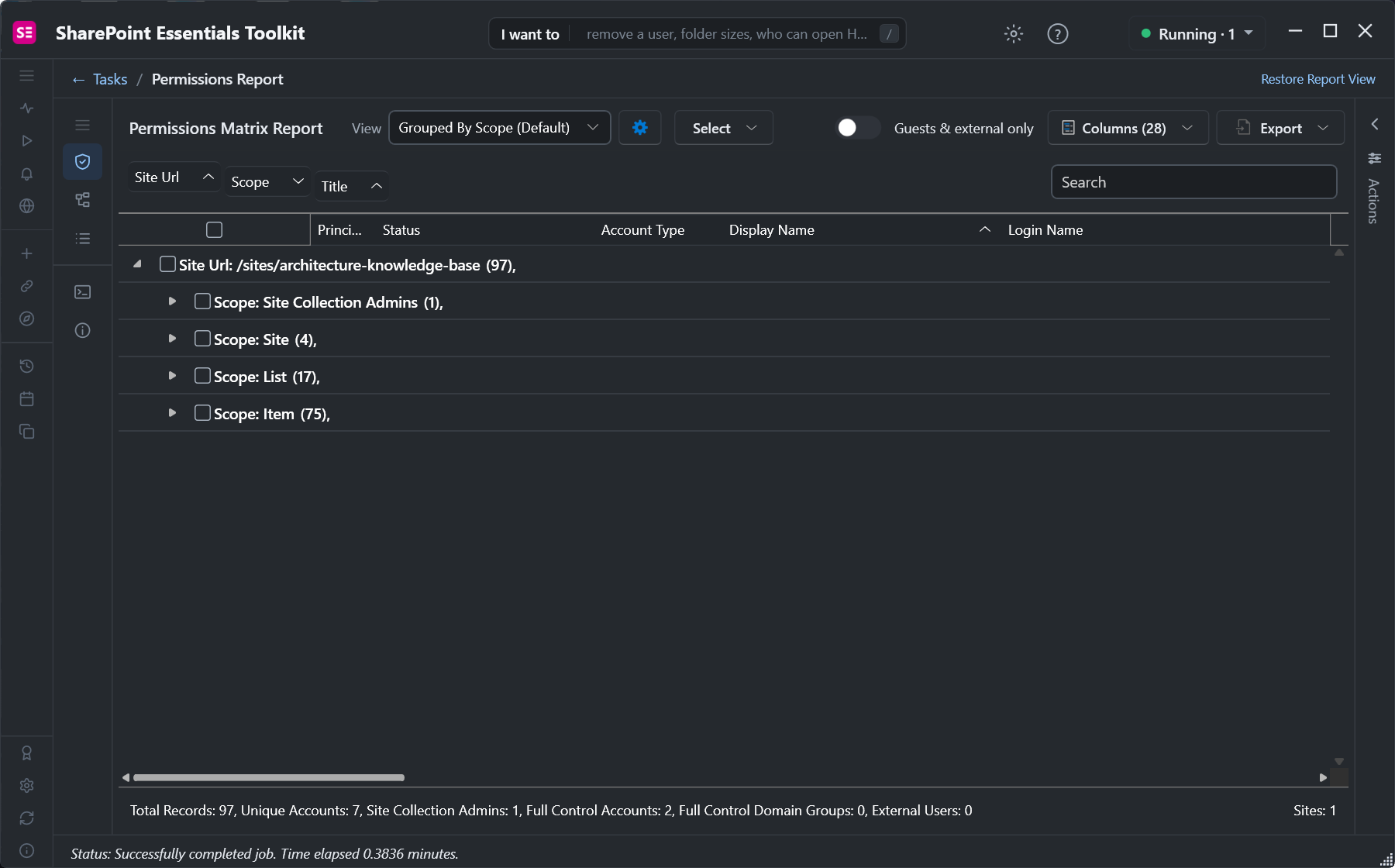
75 of 97 permission entries are on individual items.
Turn off Include Inherited Permissions in Settings to leave out everything that inherits, so every row is something with its own permissions. In the report, Select > Everything with unique permissions ticks all of them at once.
2. Reset them to inherited
Open Actions and choose Reset to inherited. The review lists each object, what it will inherit from, and which sharing links stop working. Here we reset a file and two folders found through the sharing links report.
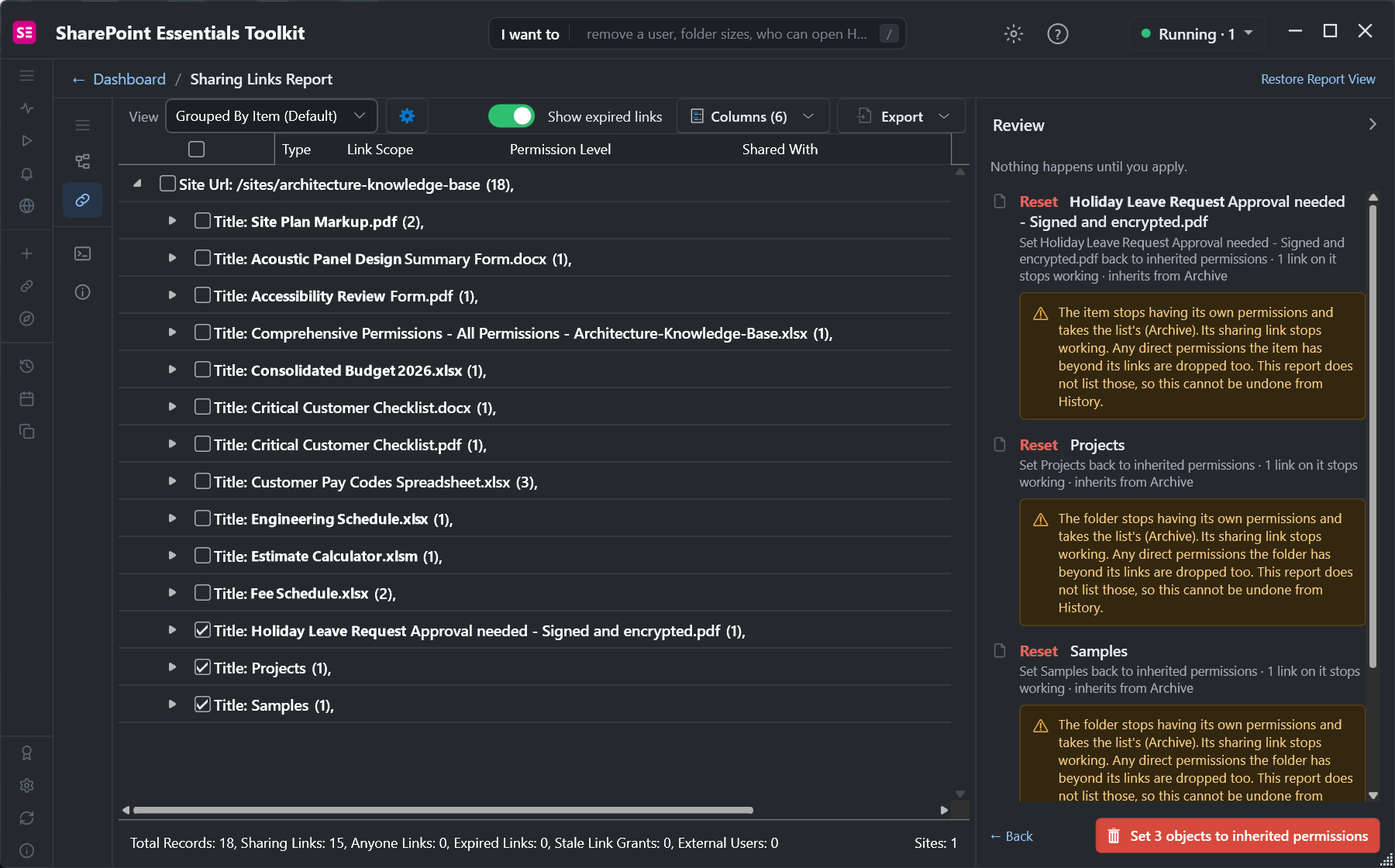
Each object takes its library's permissions; its own permissions and links are dropped.
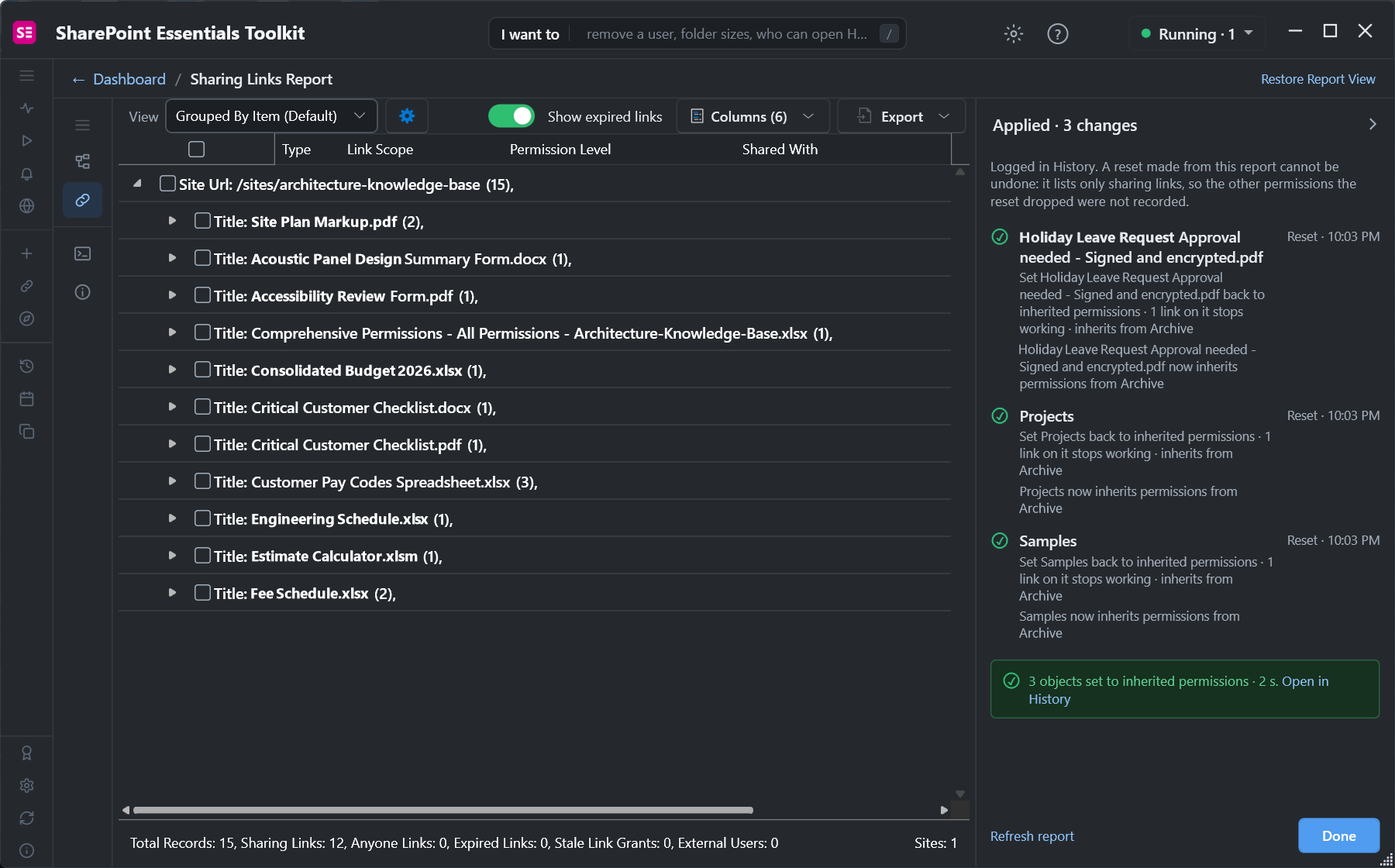
Three objects back to inherited permissions, logged in History.
To start from scratch, use the Reset unique permissions in bulk task, which runs the report with inherited permissions left out so the reset only targets objects with their own permissions.
The Permissions report is free in Community Edition on up to 20 sites. Resets apply up to 10 objects each time you select Apply on Community.
Frequently asked questions
How many unique permissions can a SharePoint list have?
Microsoft supports up to 50,000 unique permission scopes per list or library, and recommends staying under 5,000. Above that, page loads, views and search get slower, and permissions become hard to audit.
Why can't I break or restore inheritance on a SharePoint library?
You can't break or restore inheritance on a list, library or folder with more than 100,000 items. Move content out until it is under the limit, or change permissions on smaller folders below it.
Does sharing a file break permission inheritance?
Yes. Sharing a file or folder with specific people, or creating a sharing link, gives that item unique permissions. It is the most common reason libraries end up with thousands of unique permissions.
What happens when I delete unique permissions in SharePoint?
The object takes its parent's permissions again. Every permission set directly on it, and every sharing link on it, is removed. People who only had access through those lose it.
How do I find all items with unique permissions in SharePoint?
Use Show these items on the site's Advanced permissions settings page, query HasUniqueRoleAssignments with PnP PowerShell, or run the Permissions report in SharePoint Essentials Toolkit with inherited permissions turned off.
Find and reset unique permissions free
SharePoint Essentials Toolkit Community Edition is free. Report every site, library, folder and file with its own permissions, and reset them to inherited in batches of up to 10, on up to 20 sites per Microsoft 365 tenant. Get your free Community Edition license key.
About the author. The Cognillo SharePoint Team builds and supports SharePoint Essentials Toolkit and has worked with SharePoint administrators on permissions audits, migrations and cleanup projects since 2012.