Site Collection Admin or SharePoint Admin Can't See or Find a Site? Why It Happens and How to Fix It
The SharePoint Administrator role lets you manage sites but doesn't give access to their content. To open a site, add yourself as a site admin under Active sites > Membership, or with Set-SPOUser -IsSiteCollectionAdmin $true. If you can't find the site, it may not be indexed for search yet, excluded from search, locked, deleted, or a OneDrive account, which the default views and cmdlets leave out.
Published:
Last updated: 2026-10-29
Can't open it, or can't find it?
| Symptom | Cause | Fix |
|---|---|---|
| Access denied as a SharePoint admin | The SharePoint Administrator role manages sites but doesn't grant access to content | Add yourself as a site admin |
| Recently added as a site admin, still denied | Added through the Microsoft 365 group's owners, or the change hasn't reached your session | Wait, then sign out and back in; or add yourself directly as a site admin |
| Redirected to a "site locked" page | The site's lock state is NoAccess or ReadOnly | Check the lock state and unlock it |
| Site not in search or the SharePoint start page | New sites take time to index; sites you've never visited don't appear in Frequent; the site may be excluded from search | Open it by URL; check "Allow this site to appear in search results" |
| Site not in Active sites or Get-SPOSite | It's a OneDrive account, or it was deleted | Use the filters below, or check Deleted sites |
| A user with Full Control can't see some content | Owners (Full Control) aren't site collection admins; content with unique permissions can exclude the Owners group | Make them a site admin, or grant access on that content |
Option 1: Get access with built-in tools
Add yourself as a site admin
- In the SharePoint admin center, go to Sites > Active sites and search for the site.
- Select it, open Membership > Site admins, and add yourself.
On a group-connected site, the panel shows group owners, group members and site admins separately. Adding yourself as a site admin gives access without making you an owner in Teams. Microsoft explains the roles in Admin center site permissions reference.
Find a missing site
- Active sites doesn't list OneDrive accounts; find those under Users in the Microsoft 365 admin center or with PowerShell.
- Check Sites > Deleted sites. Sites stay there for 93 days; see How to recover deleted sites.
- On the site, Site settings > Search and offline availability controls whether it appears in search results. Turning it back on needs a reindex before results show up.
Option 2: Find the site and add yourself with PowerShell
The SharePoint Online Management Shell finds sites the admin center views leave out, shows why you might not be able to open one, and adds you as a site admin. Only the last command changes anything.
Connect-SPOService -Url "https://contoso-admin.sharepoint.com"
$Me = "admin@contoso.com"

# Find it, including OneDrive accounts
Get-SPOSite -Limit All -IncludePersonalSite $true -Filter "Url -like 'projects'" |
    Select-Object Url, Title, Template, LockState, Owner

# Or check whether it was deleted
Get-SPODeletedSite -IncludePersonalSite | Where-Object Url -like "*projects*"

# Why can't I open it?
$SiteUrl = "https://contoso.sharepoint.com/sites/Projects"
Get-SPOSite -Identity $SiteUrl -Detailed |
    Select-Object Url, LockState, SharingCapability, GroupId, Owner, RestrictedAccessControl

# Am I a site admin?
Get-SPOUser -Site $SiteUrl -Limit All | Where-Object IsSiteAdmin |
    Select-Object DisplayName, LoginName

# Add me as a site admin
Set-SPOUser -Site $SiteUrl -LoginName $Me -IsSiteCollectionAdmin $true
What to know:
LockStateofNoAccessblocks everyone, admins included. Unlock it withSet-SPOSite -LockState Unlockif the lock was a mistake.- If
RestrictedAccessControlis on, only members of the groups set on the site can get in, even with permissions. - Remove yourself again with
-IsSiteCollectionAdmin $falsewhen you're done, so admin access doesn't pile up.
Option 3: Report site admins across every site with SharePoint Essentials Toolkit
The toolkit can't add you as a site admin; it needs access to read a site. What it shows is who the site admins are on every site you can reach, so you can see where your admin access is missing or where too many people have it.
Run the Permissions report and group by scope. Site Collection Admins is its own scope, listed before the site's groups.
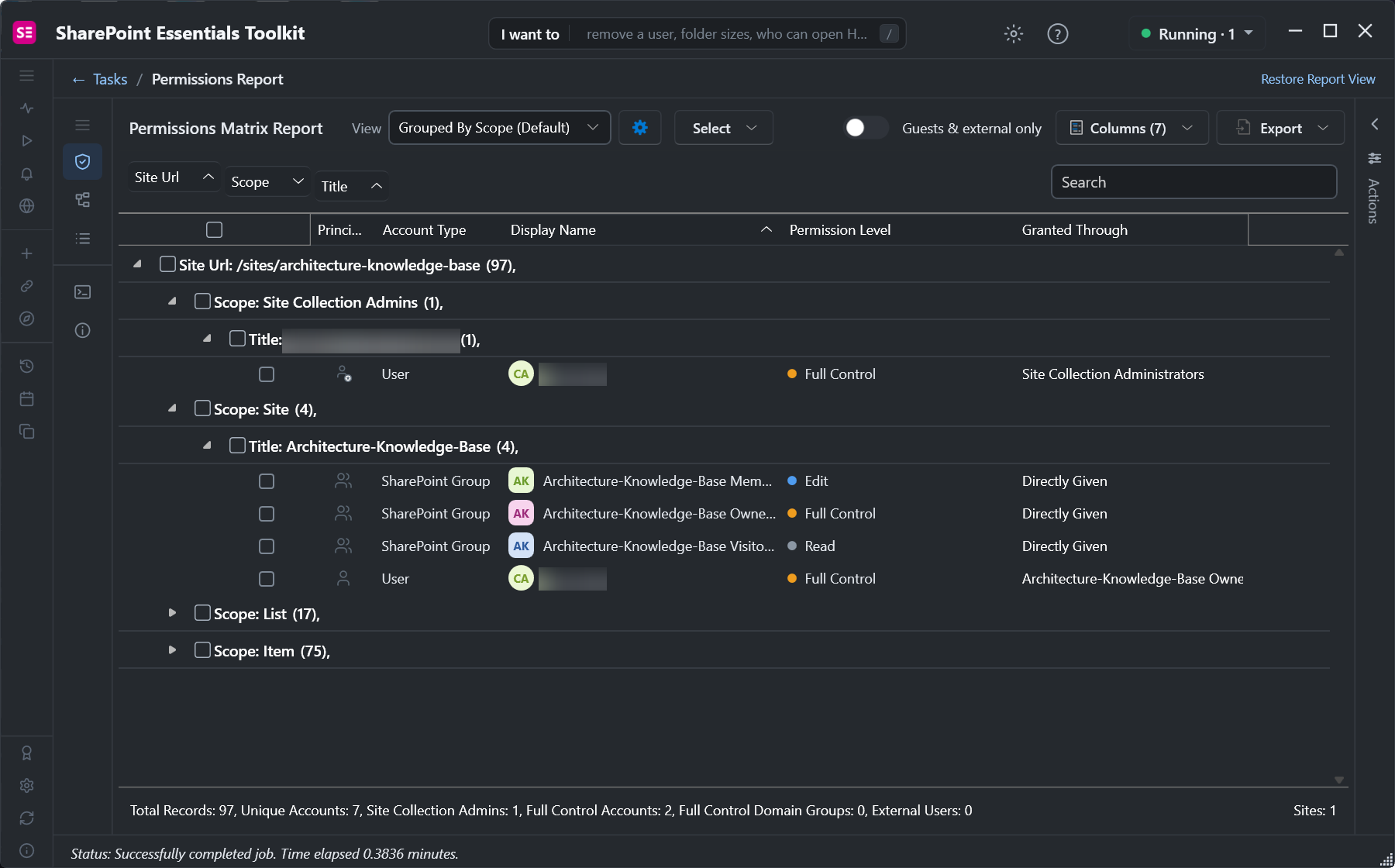
For a tenant-wide view, Who has Full Control in the Permissions area lists site admins, owners, domain groups and SharePoint groups with Full Control on every site you pick. To build the list of sites in the first place, use a Discovery saved search, which finds sites by URL, template or age and keeps new ones included each time a task runs.
Frequently asked questions
Why can't a SharePoint admin open a site?
The SharePoint Administrator role manages sites in the admin center but doesn't give access to their content. Add yourself as a site admin under Active sites, Membership, or run Set-SPOUser -IsSiteCollectionAdmin $true.
What is the difference between a site owner and a site collection admin?
Owners are in the site's Owners group with Full Control and can be excluded from content that has its own permissions. Site collection admins have full control of everything in the site collection, including the second-stage recycle bin and content with unique permissions.
Why doesn't a SharePoint site show up in search?
New sites take time to index, sites you've never visited don't appear in the SharePoint start page's Frequent list, and a site can be excluded from search in Site settings, Search and offline availability. Open it by URL to confirm it exists.
Why doesn't Get-SPOSite return a site?
Get-SPOSite leaves out OneDrive accounts unless you add -IncludePersonalSite $true, and it doesn't return deleted sites; use Get-SPODeletedSite for those. Use -Limit All, or it stops at the first 200.
How do I see every site collection admin in my tenant?
Loop over Get-SPOSite and Get-SPOUser where IsSiteAdmin is true, or run Who has Full Control in SharePoint Essentials Toolkit, which lists site admins, owners and Full Control groups on every site you pick.
See who administers every site, free
SharePoint Essentials Toolkit Community Edition is free. Report site collection admins, owners and Full Control groups on up to 20 sites per Microsoft 365 tenant. Get your free Community Edition license key.