Find Files Shared With Everyone and Files Missing a Sensitivity Label in SharePoint
Last updated: 2026-10-21
SharePoint files shared with everyone are files, folders, lists or sites granted to Everyone, Everyone except external users, All authenticated users, or an Anyone or organization link. The riskiest are those with no sensitivity label that nobody has touched in years. SharePoint Essentials Toolkit finds all three groups with three reports, and Community Edition runs them free on up to 20 sites.
SharePoint files shared with everyone are files, folders, lists or sites granted to Everyone, Everyone except external users, All authenticated users, or an Anyone or organization link. The riskiest are those with no sensitivity label that nobody has touched in years. SharePoint Essentials Toolkit finds all three groups with three reports, and Community Edition runs them free on up to 20 sites.
Why does widely shared content matter?
Most SharePoint oversharing is not malicious. Someone wanted the whole company to see a policy, so they shared the library with Everyone except external users. Later, salary data landed in the same library. Or a manager sent an Anyone link to a supplier in 2019 and forgot about it.
Compliance and security teams need the short list: what is open to everyone, what is unprotected, and what is old enough to lock down without upsetting anyone. That overlap is also what Microsoft 365 Copilot will surface first, because it answers from anything users can open.
What does "widely shared" mean in practice?
| Grant | Who it reaches |
|---|---|
| Everyone except external users | Every internal account in the tenant |
| Everyone / All authenticated users | Every signed-in account, which can include guests depending on tenant settings |
| Anyone link | Anyone with the URL, no sign-in |
| People in your organization link | Any internal user with the URL |
A sensitivity label adds protection that travels with the file. An unlabeled file has only its SharePoint permissions. Microsoft explains labels in Learn about sensitivity labels.
Option 1: Built-in Microsoft 365 tools
Every item shared with Everyone: the special SharePoint groups report
With SharePoint Advanced Management, the SharePoint admin center can list every site, folder and file that Everyone or Everyone except external users can open:
- In the SharePoint admin center, go to Reports > Data access governance.
- Under Snapshot reports, find Sites and files shared via special SharePoint groups and select View reports.
- Select Run report for the Everyone group or the Everyone except external users group.
- When the status shows the report is available, select Download report for a CSV of every item, its permission level and the parent group when access is indirect.
This is the most direct built-in answer. Per Microsoft Learn, it needs the SharePoint Advanced Management Administrator role and needs the organization-wide site permissions report to have run first. Its data can be up to 48 hours old, downloads are capped at 1 million rows, and it can be rerun every 30 days. It covers the two Everyone groups, not Anyone or organization links.
Where broad sharing is happening now: activity reports
On the same page, Shared with 'Everyone except external users' and Sharing links show the sites with the most new organization-wide sharing in the last 28 days. They show which sites to look at, not individual files. Microsoft describes both in Data access governance reports.
Which sites hold labeled files: sensitivity label report
The Sensitivity label applied to files snapshot report lists sites that contain files with a given label. In Microsoft Purview, content explorer and activity explorer show labeled content in more detail. Neither tool lists the files that have no label, so you can't use them on their own to find "open to everyone and unlabeled."
Option 2: PowerShell
Start the Microsoft report
If you have SharePoint Advanced Management, the SharePoint Online Management Shell can start the item-level report. Microsoft's PowerShell guide notes that it needs a recent module version:
Start-SPODataAccessGovernanceInsight -ReportEntity EveryoneExceptExternalUsers -ReportType Snapshot
Start-SPODataAccessGovernanceInsight -ReportEntity Everyone -ReportType Snapshot
Find Everyone grants yourself with PnP PowerShell
Without SharePoint Advanced Management, you can look for the Everyone claims in role assignments and in SharePoint groups. Everyone except external users has a login name containing spo-grid-all-users, and Everyone is c:0(.s|true. This script checks each site, its lists and libraries with unique permissions, and its SharePoint groups. Install PnP PowerShell 2.x or later and register your own Entra ID app first.
# Sites, lists and SharePoint groups open to Everyone or Everyone except external users
$ClientId = "<your-app-id>"
$Tenant   = "contoso"
function Test-Everyone($login) { $login -like "*spo-grid-all-users*" -or $login -eq "c:0(.s|true" }

function Get-EveryoneGrants($Object, $SiteUrl, $Scope, $Path) {
    Get-PnPProperty -ClientObject $Object -Property RoleAssignments | Out-Null
    foreach ($ra in $Object.RoleAssignments) {
        Get-PnPProperty -ClientObject $ra -Property RoleDefinitionBindings, Member | Out-Null
        if (Test-Everyone $ra.Member.LoginName) {
            [pscustomobject]@{ Site = $SiteUrl; Scope = $Scope; Path = $Path
                Via = "Direct"; OpenTo = $ra.Member.Title
                Levels = $ra.RoleDefinitionBindings.Name -join "; " }
        }
    }
}

Connect-PnPOnline -Url "https://$Tenant-admin.sharepoint.com" -Interactive -ClientId $ClientId
$sites = Get-PnPTenantSite | Where-Object Template -notlike "REDIRECTSITE*"

$rows = foreach ($site in $sites) {
    try {
        Connect-PnPOnline -Url $site.Url -Interactive -ClientId $ClientId
        Get-EveryoneGrants (Get-PnPWeb) $site.Url "Site" $site.Url

        Get-PnPList -Includes HasUniqueRoleAssignments |
            Where-Object { -not $_.Hidden -and $_.HasUniqueRoleAssignments } |
            ForEach-Object { Get-EveryoneGrants $_ $site.Url "List" $_.Title }

        foreach ($group in Get-PnPGroup) {
            Get-PnPGroupMember -Group $group | Where-Object { Test-Everyone $_.LoginName } |
                ForEach-Object {
                    [pscustomobject]@{ Site = $site.Url; Scope = "SharePoint group"; Path = $group.Title
                        Via = "Member of $($group.Title)"; OpenTo = $_.Title; Levels = "(see group's grants)" }
                }
        }
    }
    catch { Write-Warning "$($site.Url): $($_.Exception.Message)" }
}

$rows | Export-Csv "C:\Reports\open-to-everyone.csv" -NoTypeInformation -Encoding UTF8
Test it on one site first. To reach folders and files, add the per-item loop from the SharePoint permissions report article, which makes one request per item. Anyone and organization links need a separate pass with Get-PnPFileSharingLink. To find unlabeled files, you also need to read each file's sensitivity label, which adds another lookup per file.
Option 3: SharePoint Essentials Toolkit
Three reports in the Copilot and Oversharing areas answer the question at file level with no scripting. They cover Everyone claims and Anyone links together, and they combine "open to everyone" with "has no label" and "not touched in years." They read live data and don't need SharePoint Advanced Management.
Report 1: Sites and content open to everyone
This report finds every site, list, folder and item that Everyone, Everyone except external users or an Anyone link can reach. Pick it under Tasks > Copilot, select your sites and run. Page libraries are left out by default, and the summary says so.
On four test sites it returned 40 records: 25 open sites, lists and items, 21 of them with Edit or higher, and 15 Anyone links.
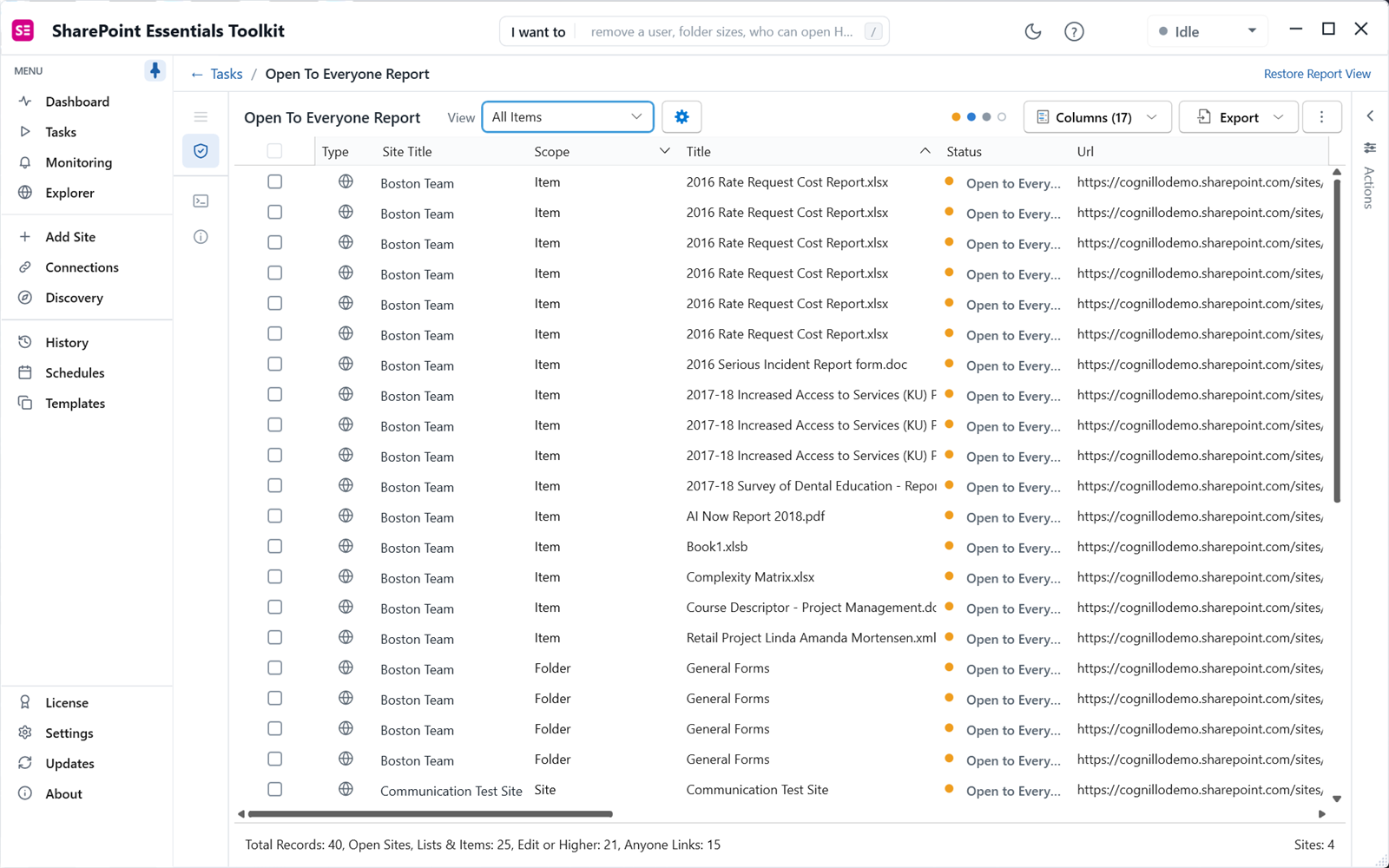
Scroll right to see Open To, Open To Type, Permission Level, Can Edit and Full Control. Here you can tell an Anyone link with Edit from an Everyone except external users grant with Read.
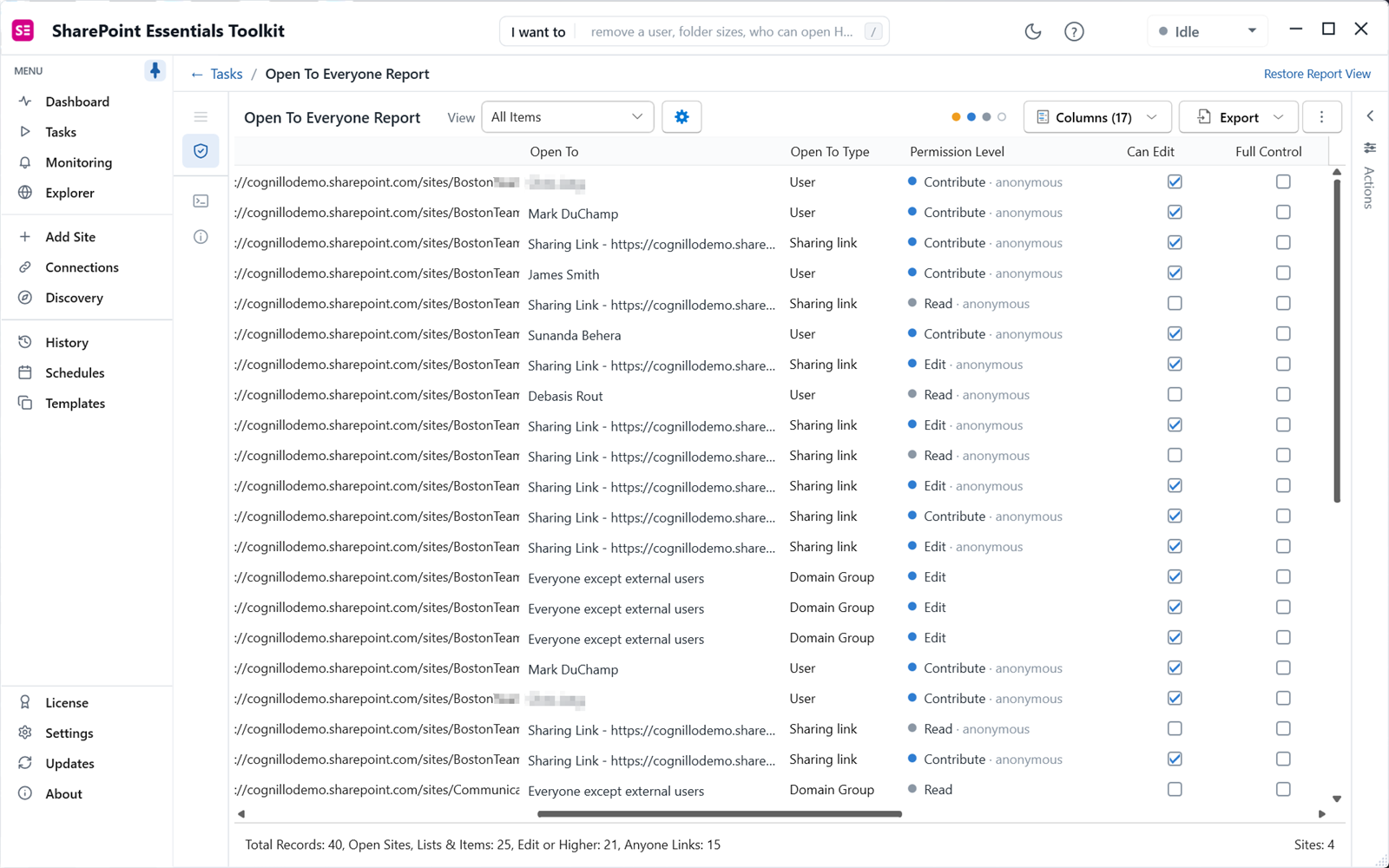
This is also the report to run with Include Domain Group Members on, to catch content open to everyone through a group nested inside another group. On SharePoint Online that needs an Azure app registration on the connection. See how nested groups work in permissions reports.
Report 2: Unlabeled files that are widely shared
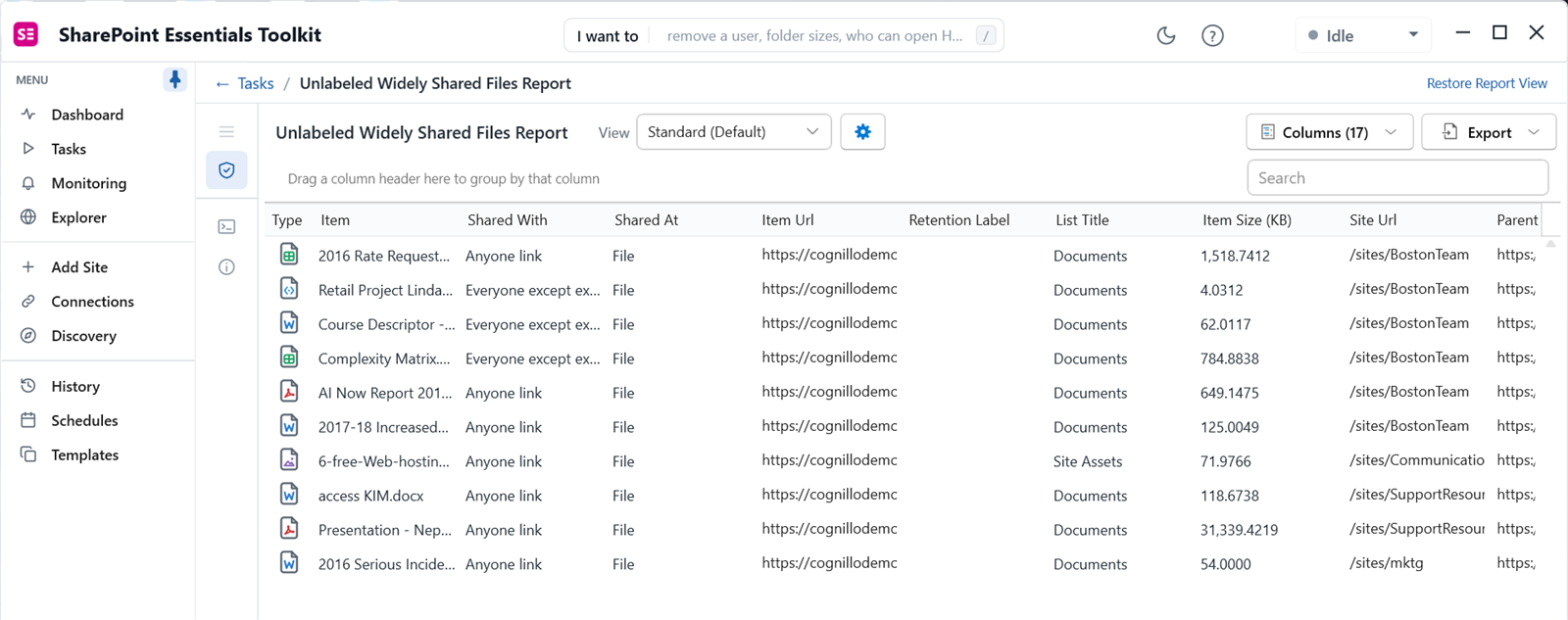
This report lists every file with no sensitivity label that is broadly reachable: Everyone, Everyone except external users, All authenticated users, or an Anyone or organization link. The app describes these as "the files most likely to surface in Copilot and search, so label or narrow them first."
On the same four sites it narrowed 40 records to ten files. Each row shows who it is shared with, at what level (file or above), the retention label, the size and the site.
Report 3: Stale content still open to everyone
This report lists files, pages and list items that nobody has touched for a year or more and that are still broadly reachable. Sort by Days Untouched.
Our three-site run found nine items. Two presentations and a document had not been modified for 2,830 days or more, about seven and a half years, and were still open through Anyone links. Four project files untouched for 1,665 days were open to Everyone except external users.
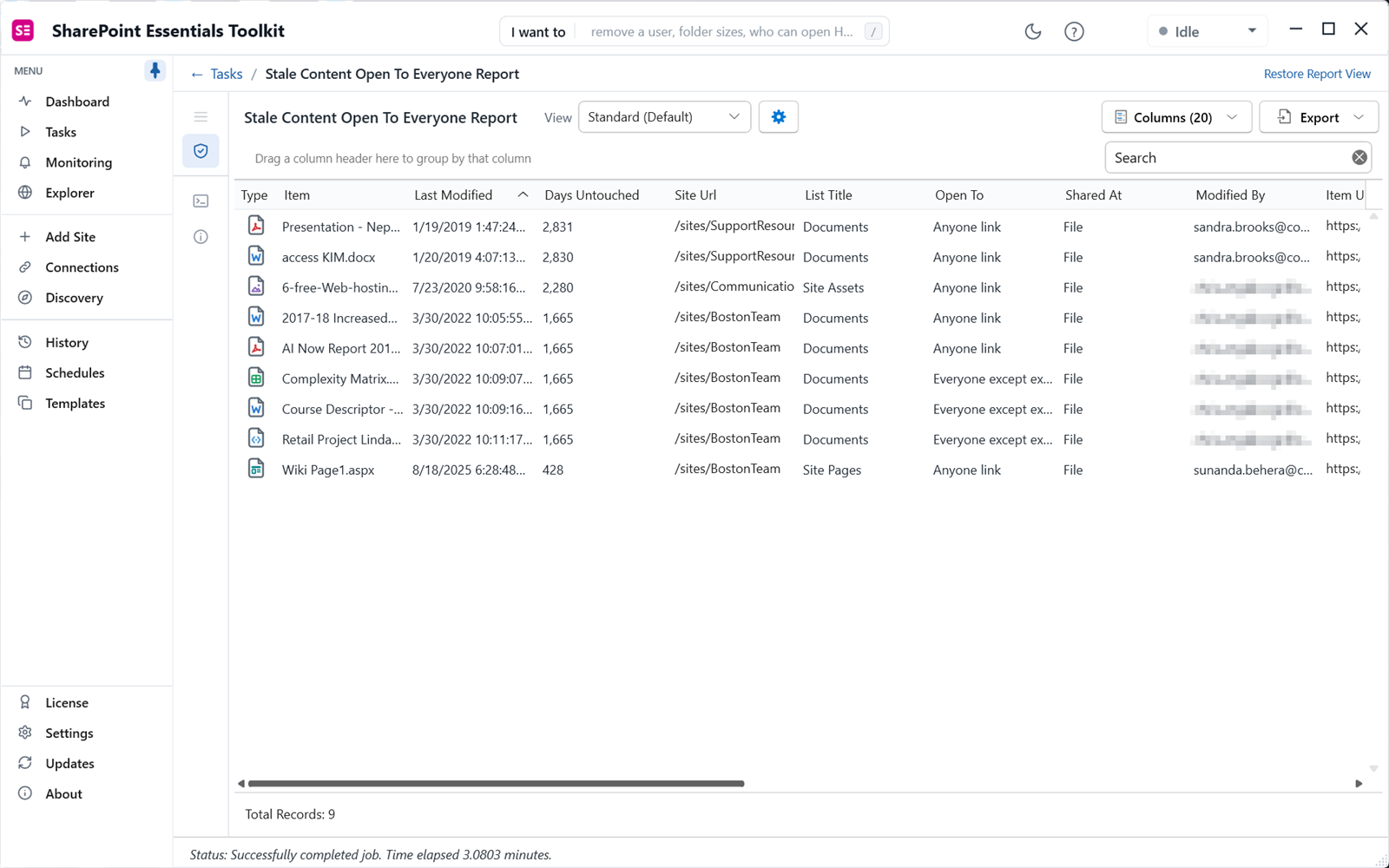
Reports 2 and 3 check direct grants to Everyone claims and open links. They do not look inside groups, and the app shows a notice before they run. Use Report 1 with group expansion for nested access.
In what order should you triage?
- Unlabeled and open to everyone with Edit. Anyone in the company, or anyone with the link, can change it.
- Unlabeled and sensitive by name or location. Salary, payroll, contracts, customer lists, HR folders.
- Stale and open through Anyone links. Remove the link. Nobody is using it for work.
- Stale and open to Everyone except external users. Archive the file or reset it to inherit from a private library.
- Whole sites or libraries open to everyone. Replace the grant with a named group, then check what breaks.
To find files by what they contain rather than where they are, run a content search across sites for words such as "confidential" or "payroll" and compare the results with these reports.
How do you fix what you find?
Tick rows and open the Actions panel to remove links or reset items to inherited permissions. The Copilot area also has Remove or downgrade links and Reset unique permissions in bulk. Each change is shown for review before it is applied. Community Edition can apply small fixes; bulk changes need a paid edition. Apply labels in Microsoft Purview, or through your label policy's default library label.
For links specifically, the sharing links report adds expiry and creator. For the full Copilot preparation, see Copilot readiness: find overshared SharePoint files. To decide what to archive, use the site content report.
Frequently asked questions
What does Everyone except external users mean in SharePoint?
It is a built-in claim that includes every internal account in your Microsoft 365 tenant, including new hires on their first day. Guests are excluded. Granting it access to a site, library or file opens that content to the whole organization. It is the most common cause of widely shared content and of Copilot oversharing findings.
How do I find files that have no sensitivity label?
Microsoft Purview content explorer and activity explorer show labeled content. To find what is not labeled and also widely shared, run a report that reads each file's label together with its permissions. The SharePoint Essentials Toolkit unlabeled widely shared files report does this and lists only files that are both unlabeled and open to a broad audience.
What counts as stale content?
In the stale content still open to everyone report, stale means nobody has modified the file, page or list item for a year or more. The Days Untouched column shows exactly how long. Stale content that is still widely open is a good first target because few people rely on it, so narrowing or archiving it rarely disrupts work.
Do these reports find access through nested groups?
The unlabeled and stale reports check direct grants to Everyone claims and open sharing links, and the app tells you this before they run. To include content that is open to everyone through a group inside another group, run Sites and content open to everyone with Include Domain Group Members turned on. That needs an Azure app registration on SharePoint Online.
Can I fix widely shared files from the report?
Yes. Tick rows and use the Actions panel to remove a link or reset a file to inherit permissions from its library. Every change is listed for review before it is applied. Community Edition can apply small fixes so you can see how it works. Bulk changes, such as resetting hundreds of files at once, need a paid edition.
Find your widely shared, unlabeled files free
SharePoint Essentials Toolkit Community Edition is free. Run all three reports on up to 20 sites per Microsoft 365 tenant, with no item caps and no trial period. Get your free Community Edition license key.