Included with SharePoint Essentials Toolkit. See editions and pricing
Microsoft 365 Copilot readiness for SharePoint
Get SharePoint Ready for Copilot. Fix Oversharing First.
Copilot doesn't change who can open a file. It makes everything people can already open easy to find. Before you roll it out, find the SharePoint files open to everyone, the Anyone links nobody remembers, and the sensitive files with no label, then fix them in bulk. Free on up to 20 sites, with no extra Microsoft licensing.
Why oversharing matters more with Copilot
Microsoft 365 Copilot answers questions using content the signed-in user can already reach: through site membership, groups, Everyone claims and sharing links. Oversharing that was harmless when nobody could find the file becomes visible when anyone can ask "What are the salary bands for my team?" or "Summarize the acquisition plans".
- A spreadsheet shared with Everyone except external users in 2019 is one prompt away from every employee.
- An organization link on an HR folder opens it to the whole company.
- A stale project site that inherited broad access still holds contracts and pricing.
Copilot is only as safe as your permissions. Readiness means knowing what's open, fixing what shouldn't be, and watching for it to come back.
The four-report Copilot readiness pass
Open Tasks > Copilot in SharePoint Essentials Toolkit. The reports are grouped under Report and the matching fixes under Fix.
Permissions baseline
Every grant on every site, list, folder and file, including site collection admins, external users and access through sharing links. Your "before" picture and audit evidence.
Sharing links
Every Anyone, organization and specific-people link, with permission, expiry and creator. Organization links matter because they open a file to a broad internal audience.
Unlabeled files that are widely shared
Files with no sensitivity label that are open to Everyone, Everyone except external users, All authenticated users, or an Anyone or organization link. Your shortest high-risk list.
Stale content still open to everyone
Files, pages and items untouched for a year or more that are still broadly reachable. In one test, the oldest had been untouched for over seven years and was still open through an Anyone link.
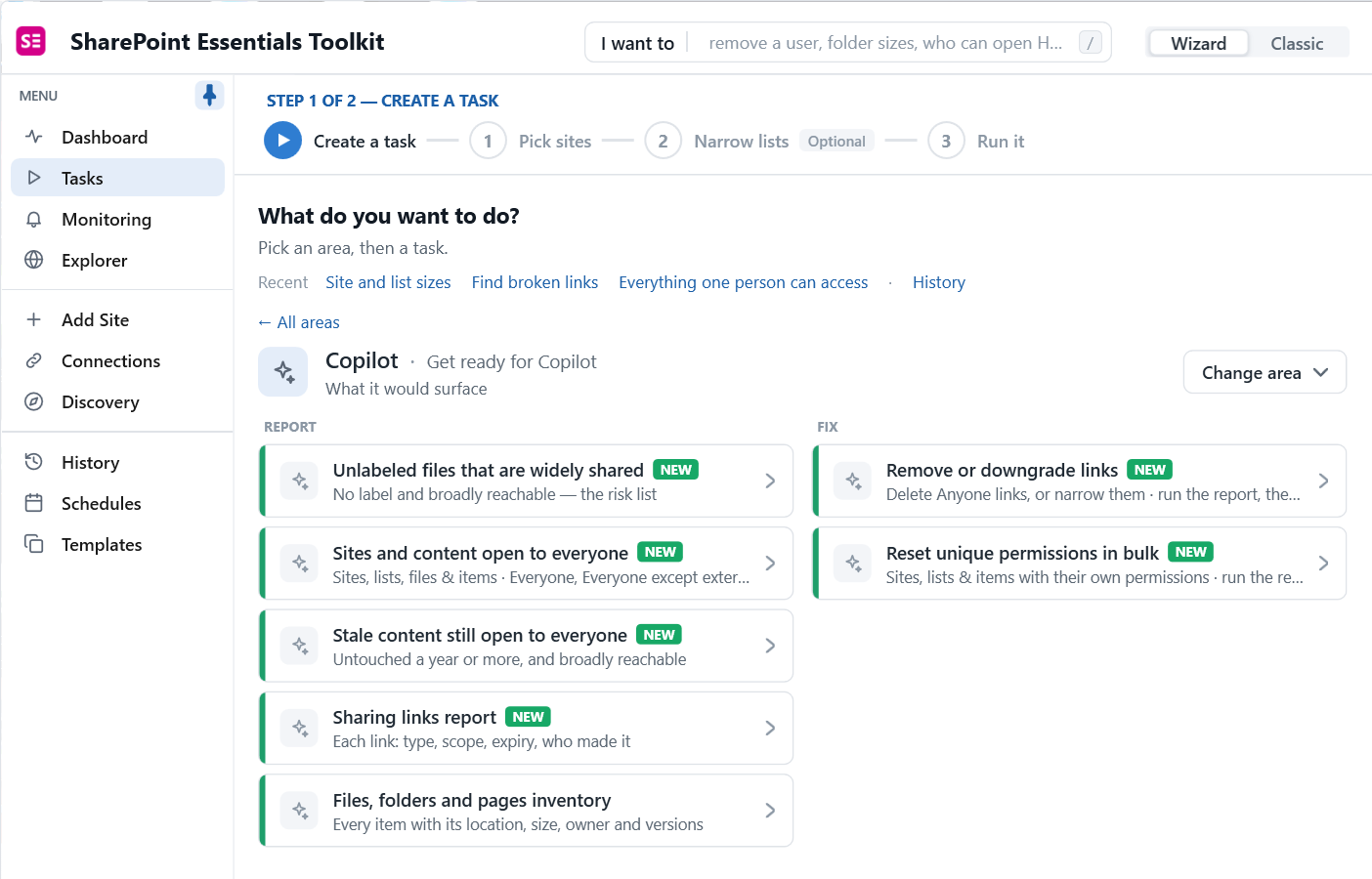
Add Sites and content open to everyone with group expansion to catch Everyone claims nested inside groups, Who has Full Control for privileged access, and Everything guests can reach for external exposure.
Fix it in bulk, with a record of every change
Remove or downgrade links
Delete Anyone links, narrow who links work for, remove people from links, and set or shorten expiry.
Reset unique permissions
Return sites, lists, folders and files that were opened up to inheriting from a private parent.
Label and archive
Apply sensitivity labels to unlabeled files in bulk, or send stale content to Microsoft 365 Archive.
Every Actions panel lists each change before it's applied, and permission changes can be undone from History. Removed sharing links can't be undone, so they're shown one by one first.
Keep it fixed after rollout
- Oversharing monitor: scheduled reports compared run over run, with email alerts when content open to everyone or sharing links increase.
- Activity alerts for new Anyone links and content shared with everyone or with external users.
- Dashboard trends you can show leadership: oversharing going down, site by site.
Where Microsoft's controls fit
| Control | What it does | When to use it |
|---|---|---|
| Restricted SharePoint Search | Limits organization-wide search and Copilot to an allowed list of sites. Doesn't change permissions. | Temporarily, when Copilot must launch before cleanup is done |
| Restricted Content Discovery | Keeps a site out of search and Copilot for people who aren't its regular users | For specific sensitive sites, such as HR |
| Sensitivity labels with encryption | Limits who can open a file, wherever it goes. Copilot respects it. | For content that must stay protected |
| Data access governance and site access reviews | Site-level oversharing reports and owner reviews (SharePoint Advanced Management) | Ongoing governance, alongside item-level reports |
None of these replace knowing what's open. The readiness reports tell you where to apply each control.
A one-page Copilot readiness checklist
- List your sensitive sites: HR, finance, legal, executive, M&A, customer data.
- Run the permissions report on those sites and export it as your baseline.
- Run the sharing links report. Remove Anyone links with edit, and links with no expiry.
- Run unlabeled files that are widely shared. Narrow access or label each file.
- Run stale content still open to everyone. Archive, delete or lock it down.
- Run sites and content open to everyone with group expansion for nested access.
- Check who has Full Control and what guests can reach.
- Decide whether you need Restricted SharePoint Search during cleanup.
- Run the permissions report again and compare it with the baseline.
- Set up oversharing monitors, then repeat for the next group of sites.
Editions
| Capability | Community (free) | Professional | Enterprise |
|---|---|---|---|
| All Copilot readiness and oversharing reports | Yes, full depth | Yes | Yes |
| Fix links and permissions, apply labels from reports | Up to 10 changes per Apply | Up to 10 changes per Apply | Unlimited |
| Sites | 20 per Microsoft 365 tenant | More sites; see pricing and the full comparison | |
Frequently asked questions
Does Microsoft 365 Copilot change SharePoint permissions?
No. Microsoft states that Copilot only shows content a user already has at least view access to. What changes is how easy that content is to find: a file shared with Everyone except external users years ago was hard to stumble on, and with Copilot anyone can ask a question and get an answer drawn from it.
What is a Copilot readiness assessment for SharePoint?
It's a check of what your users can already reach before Copilot makes it easy to find. A practical pass is four reports: a permissions baseline, a sharing links report, unlabeled files that are widely shared, and stale content still open to everyone. Fix what they find, starting with sensitive sites, then monitor so it stays fixed.
Do I need SharePoint Advanced Management for Copilot readiness?
Not for the reports on this page. SharePoint Advanced Management adds Microsoft's own data access governance reports and controls such as Restricted Content Discovery. SharePoint Essentials Toolkit Community Edition runs the four readiness reports free on up to 20 sites without extra Microsoft licensing.
Should I use Restricted SharePoint Search?
Restricted SharePoint Search limits organization-wide search and Copilot to an allowed list of sites while you clean up, and Microsoft describes it as temporary. It doesn't change permissions: users can still open the files directly. Use it to buy time, and use reports to do the cleanup.
How long does a Copilot readiness pass take?
Running the reports takes minutes per site; in our tests each report finished in under four minutes for three to five sites. Most of the time goes into deciding what to change. Start with your most sensitive sites, such as HR, finance and legal, and work outward.
Guides and related features
Run your Copilot readiness check free
SharePoint Essentials Toolkit Community Edition runs all four readiness reports at full depth on up to 20 sites per Microsoft 365 tenant. Start with your most sensitive sites today.
Get your free Community Edition license key Talk to an expert