Included with SharePoint Essentials Toolkit. See editions and pricing
SharePoint Essentials Toolkit · Sharing links and oversharing
SharePoint Sharing Links and Oversharing: Find It, Fix It, Keep Watch
Find every sharing link in SharePoint, every file open to Everyone or Everyone except external users, and everything your guests can reach. Then remove Anyone links, shorten expiry or reset permissions in bulk from the report, and set a monitor that emails you when oversharing comes back. Free on up to 20 sites.
Where SharePoint oversharing comes from
Oversharing rarely starts with a bad decision. It builds up from convenient ones:
- Anyone links sent to a supplier years ago, still working, often with edit permission and no expiry.
- Organization links ("People in your organization") that open a file to every employee.
- Everyone except external users granted on a site or library to "make it easy", so every new hire inherits access.
- Leftover link grants: permissions that stay on a file after the link that created them is gone.
- Guests who finished their project but kept their access.
SharePoint shows sharing links one file at a time in Manage access. The admin center's activity reports cover the last 28 days, and the snapshot oversharing reports need SharePoint Advanced Management. To see every link and every open file across your sites, today, you need a report that reads them all.
What it finds
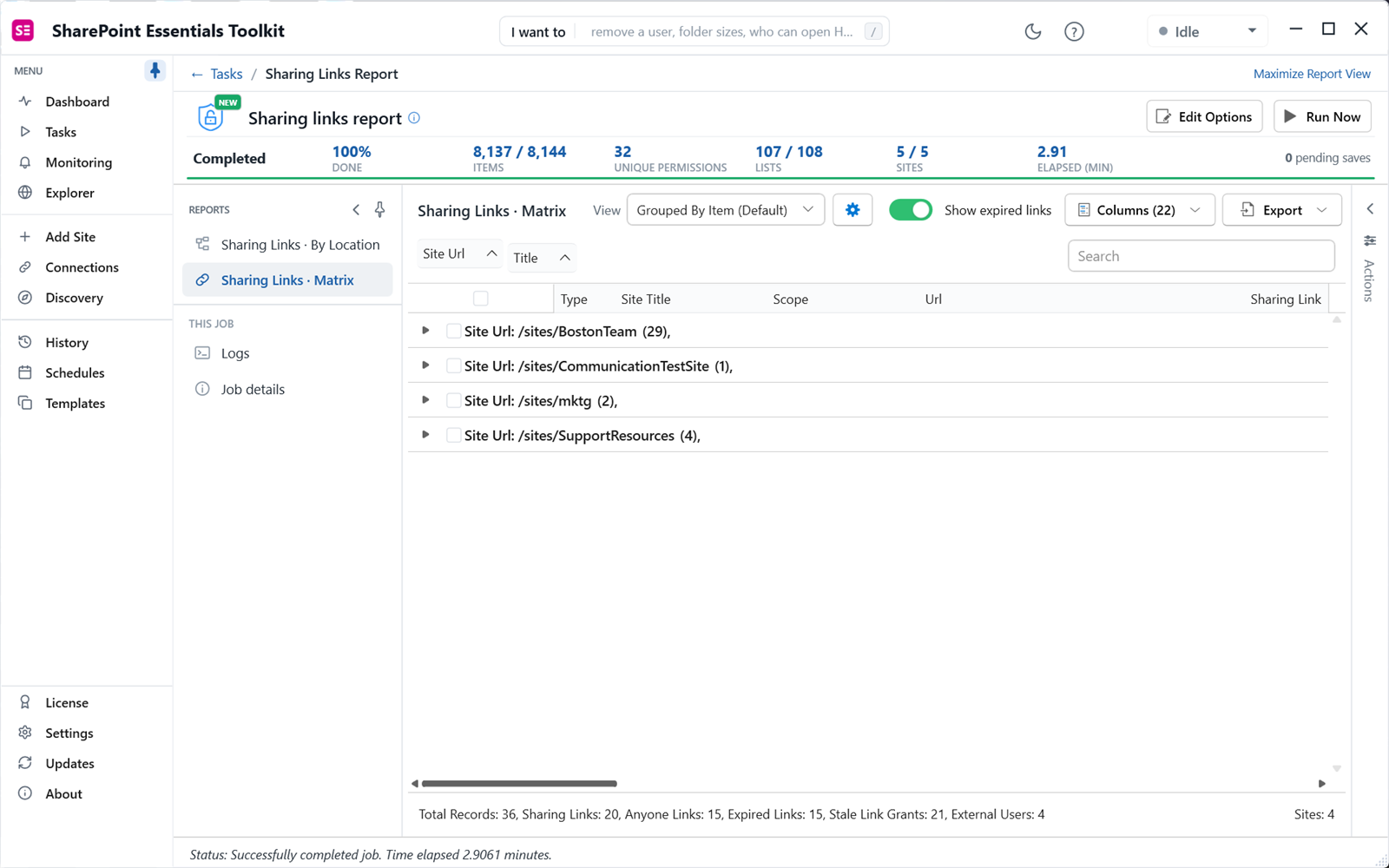
Sharing links report
Every Anyone, organization and specific-people link on every file, folder and item: link type, scope, permission (view, edit or view without download), expiry, who created it, and who it's shared with.
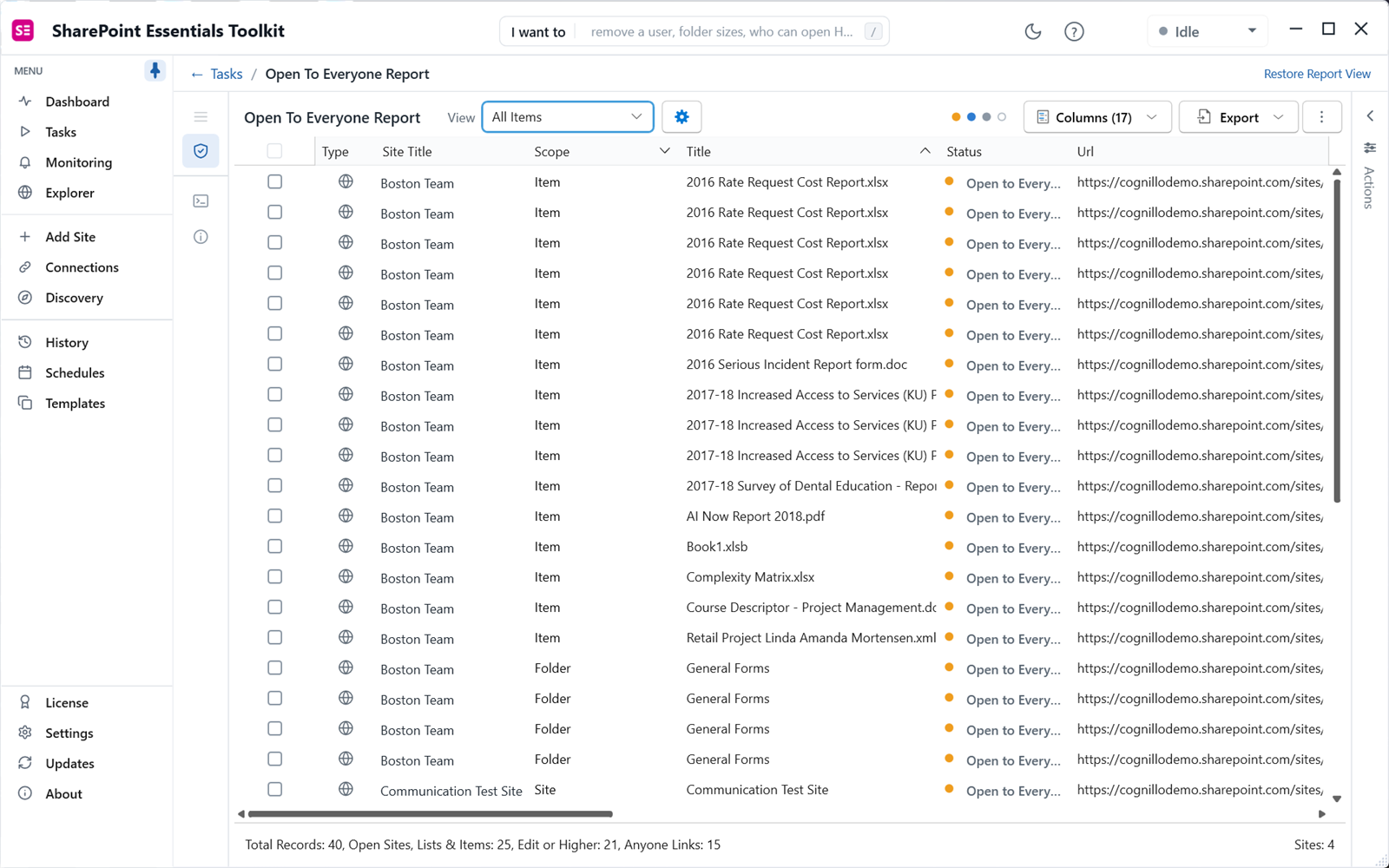
Sites and content open to everyone
Sites, lists, folders and files granted to Everyone, Everyone except external users or All authenticated users, with an option to expand SharePoint and Entra ID groups to catch nested grants.
Everything guests can reach
A SharePoint external sharing report: every guest and external account, and every site, list, folder and file they can open, through membership, direct grants or links.
Unlabeled files that are widely shared
Files with no sensitivity label that everyone can reach, through Everyone claims or Anyone and organization links. Your shortest list of high-risk files.
Stale content still open to everyone
Files, pages and items nobody has touched in a year or more that are still broadly reachable. The easiest content to lock down or archive.
Stale sharing link grants
Permissions left behind by links that no longer exist, and direct permission sprawl by user, so cleanup covers what links left behind.
Fix oversharing from the report
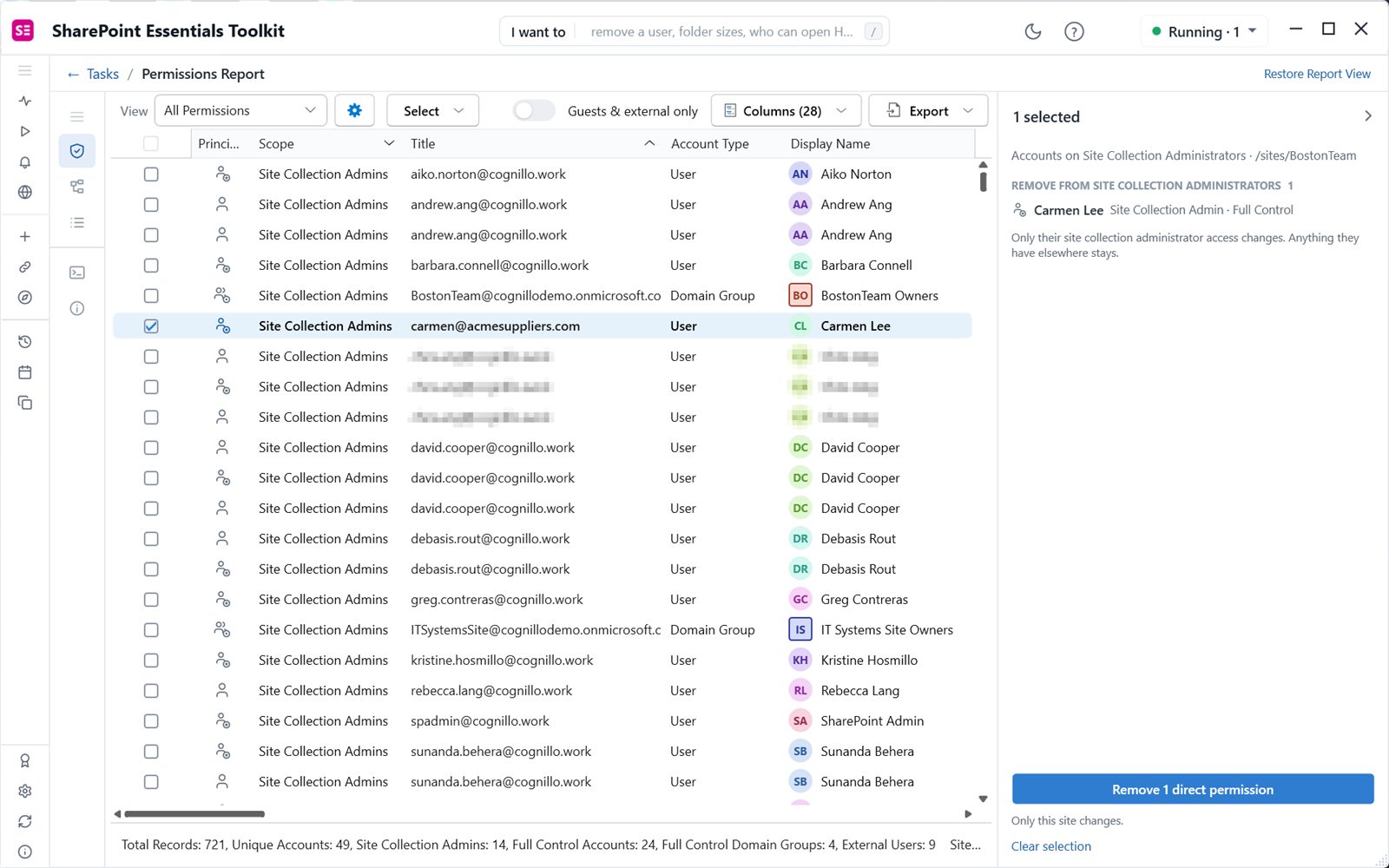
Select rows and open the Sharing Links Actions panel to remove, narrow or expire links and reset permissions in bulk, from one item to thousands at once. It lists every change before anything is applied:
- Remove sharing links, one or thousands at a time.
- Downgrade links, or narrow who a link works for.
- Remove a person from a specific-people link.
- Set, shorten or extend expiry on links that never expire.
- Reset unique permissions to inherited on folders, files and lists that were opened up.
- Apply sensitivity labels in bulk to unlabeled files from the item report.
Permission changes are recorded in History and can be undone. Removed or narrowed sharing links can't be undone, which is why the panel shows each link and its recipients before you apply.
Keep it fixed
- Oversharing monitor: schedule the open-to-everyone and sharing links reports, compare each run with the last, and get an email when counts change or cross a threshold.
- Activity alerts from the SharePoint audit log flag new Anyone links, content shared with everyone or with external users, and bursts of sharing by one person.
- Dashboard scorecards track oversharing, content open to everyone and external sharing over time.
Built-in tools compared
| SharePoint and Microsoft 365 built-in | SharePoint Essentials Toolkit | |
|---|---|---|
| Every sharing link, file by file | Manage access, one file at a time | Every link across the selected sites |
| Content open to everyone | Data access governance snapshot reports (SharePoint Advanced Management) | Item level, with nested group expansion |
| Freshness | Snapshots up to 48 hours old; activity for the last 28 days | Live when you run it |
| Combined with sensitivity labels and last-modified date | No | Yes: unlabeled widely shared, stale open content |
| Bulk fixes | Site access reviews; per-file changes | Remove, narrow or expire links and reset permissions in bulk from the report, one or thousands at a time |
Editions
| Capability | Community (free) | Professional | Enterprise |
|---|---|---|---|
| Sharing links, open to everyone, guests, unlabeled widely shared, stale open content | Yes, full depth | Yes | Yes |
| Remove, downgrade or expire links; remove a person from a link; reset inheritance; apply labels | Up to 10 changes per Apply | Up to 10 changes per Apply | Unlimited |
| Export to Excel, CSV and SharePoint, email delivery | Yes | Yes | Yes |
| Sites | 20 per Microsoft 365 tenant | More sites; see pricing and the full comparison | |
Frequently asked questions
How do I find all sharing links in SharePoint Online?
SharePoint shows sharing links one file at a time in Manage access, and the admin center gives summaries. SharePoint Essentials Toolkit reads every file, folder and item on the sites you pick and lists each link with its type (Anyone, organization or specific people), permission, expiry, creator and who it works for, with no per-site cap.
How do I find files shared with Everyone in SharePoint?
Run Sites and content open to everyone. It finds sites, lists, folders and files granted to Everyone, Everyone except external users and All authenticated users, plus content reachable through Anyone or organization links. Turn on group expansion to also catch these claims nested inside SharePoint or Entra ID groups.
Can I remove SharePoint sharing links in bulk?
Yes. Select links in the report and use the Sharing Links Actions panel to remove or downgrade links, narrow who a link works for, remove specific people from a link, or set, shorten or extend expiry. Community and Professional apply up to 10 changes per Apply; Enterprise has no cap. Removed or narrowed links cannot be undone, so the panel lists every change before you apply it.
Does turning off Anyone links in the admin center remove existing links?
No. Turning Anyone links off in the tenant or site sharing settings stops new ones from being created, and existing Anyone links stop working while the setting is off. The links still exist, though, and work again if the setting is turned back on. A sharing links report shows which links exist so you can remove them for good.
Is the sharing links report free?
Yes. SharePoint Essentials Toolkit Community Edition runs the sharing links and oversharing reports at full depth, free, on up to 20 site collections per Microsoft 365 tenant. It never expires. Fixing links in bulk beyond 10 changes per Apply needs Enterprise.
Guides and related features
Find every sharing link and open file, free
SharePoint Essentials Toolkit Community Edition runs every oversharing report at full depth on up to 20 sites per Microsoft 365 tenant. No row caps, no trial period.
Get your free Community Edition license key Talk to us about Enterprise