SharePoint Migration Tools Comparison: Which Ones Fix Broken Links?
Most SharePoint migration tools move files, metadata and permissions well. Where they differ is links. ShareGate, AvePoint Fly and Quest Content Matrix update links in pages, lists and navigation, but their own documentation says links inside Word, Excel and other files are not corrected. Microsoft's free tools and cross-tenant migration don't rewrite links at all. SharePoint Essentials Toolkit, which is free, fixes links inside Office files, PDFs and pages, including Document ID and sharing links, after a move made with any tool.
Published:
Last updated: 2026-11-05
Below: why links break, a comparison table of seven tools, and a step-by-step run where the toolkit found and fixed 44 broken links after a site move, previewing every change first.
Why links break in a SharePoint migration
Moving a file changes its address. Every place that stored the old address now points at nothing, and SharePoint stores addresses in more forms than most people expect:
- Absolute and server-relative URLs in pages, hyperlink columns and, most of all, inside documents: a Word report linking to a spreadsheet, a PDF policy linking to a form, a
.urlshortcut in a library. - Document ID links (
DocIdRedir.aspx?ID=…). The ID is issued by the site collection, so the moved file gets a new one and the old ID resolves to nothing. - GUID links (
Doc.aspx?sourcedoc={guid}), which Office creates when you copy a link from Office for the web. The moved file has a new GUID. - Sharing links (
/:w:/s/…). They belong to the original file and aren't migrated by Microsoft's tools or by ShareGate, per its migration limitations. - List item form links (
DispForm.aspx?ID=12), which break if the copy renumbers items.
A tool that rewrites only pages and navigation leaves the links inside files, often the bulk of them. Users find them one 404 at a time.
The tools at a glance
Microsoft SharePoint Migration Tool (SPMT)
SPMT is free and moves SharePoint Server 2010 to 2019 and file shares into SharePoint Online. It doesn't accept SharePoint Online as a source (SPMT FAQ), and it has no link correction feature.
Microsoft Migration Manager
Migration Manager is free in the SharePoint admin center and moves file shares and cloud drives such as Google Drive, Box and Dropbox. It has no SharePoint source and no link correction.
Microsoft cross-tenant SharePoint migration
Cross-tenant SharePoint migration moves whole sites from one tenant to another with a paid add-on license. The target site must not exist, it runs once with no incremental passes, and it leaves a redirect site at the old address. Old links forward through that redirect rather than being rewritten, so they keep working only while the redirect and the source tenant exist.
ShareGate Migrate
ShareGate Migrate is a paid desktop tool for SharePoint, Teams, OneDrive and file shares, including tenant-to-tenant moves. Its FAQ says links in pages, lists and libraries are updated. Its help article URLs that are contained in documents will not be corrected says: "ShareGate Migrate does not manipulate the content of documents." Sharing links and Document IDs are also on its limitations list.
AvePoint Fly
AvePoint Fly is a paid migration platform. Fly replaces source URLs automatically within the same site collection, and URL mappings cover the rest. The Fly migration policy guide lists column values, pages, navigation and most web parts as supported, Text web parts on modern pages as not supported, and "URL inserted in Office file" and "URL inserted in other file" as unsupported.
Quest Content Matrix
Content Matrix is a paid SharePoint-to-SharePoint migration tool with link correction for content in the migration scope, plus URL mappings. Quest's knowledge base article Link correction does not work within documents says it "does not support link correction inside of any documents stored in SharePoint", and suggests PowerShell as a workaround.
SharePoint Essentials Toolkit
A Windows desktop app for SharePoint administrators. Community Edition is free on up to 20 site collections per tenant. It copies sites and lists between SharePoint Online sites and tenants through the Migration API, with versions, authors, dates, item IDs and permissions; see free SharePoint migration tools compared for the copy itself. For links, it records every item's old addresses before the move, maps them to the new ones after, and rewrites them inside files, pages and columns.
SharePoint migration tools comparison table
Checked November 4, 2026, against each vendor's public documentation, linked above. Vendors change their products; confirm anything that decides your purchase with the vendor.
What each tool migrates
| Tool | Price | SharePoint Online to SharePoint Online | Tenant to tenant | SharePoint Server source | File shares |
|---|---|---|---|---|---|
| SPMT | Free | No | No | 2010 to 2019 | Yes |
| Migration Manager | Free | No | No | No | Yes, plus cloud drives |
| Microsoft cross-tenant migration | Paid add-on license | Between tenants only; target must not exist | Yes, one pass | No | No |
| ShareGate Migrate | Paid subscription | Yes | Yes | Yes | Yes |
| AvePoint Fly | Paid | Yes | Yes | Yes | Yes |
| Quest Content Matrix | Paid | Yes | Yes | Yes | Separate edition |
| SharePoint Essentials Toolkit | Free on up to 20 site collections per tenant | Yes, through the Migration API | Yes | 2019 and Subscription Edition | No |
How each tool handles links
| Tool | Links in pages, columns and navigation | Links inside Office files and PDFs | Document ID, GUID and sharing links | Preview and broken-link check |
|---|---|---|---|---|
| SPMT | No link correction | No | No | No |
| Migration Manager | Not applicable | No | No | No |
| Microsoft cross-tenant migration | Not rewritten; old URLs forward through a redirect site | Not rewritten; forward through the redirect while it exists | Sharing links redirect; nothing rewritten | No |
| ShareGate Migrate | Yes, in pages, lists and libraries (copy option) | No, per ShareGate help | Sharing links and Document IDs listed as limitations | Not documented |
| AvePoint Fly | Yes, with URL mappings; not modern Text web parts | No, listed as unsupported | Not documented | Not documented |
| Quest Content Matrix | Yes, link correction and URL mappings | No, per Quest KB 4314625 | Not documented | Not documented |
| SharePoint Essentials Toolkit | Yes: pages, web parts, hyperlink and text columns, attachments and Quick Launch | Yes: Word, Excel, PowerPoint, Visio, OneNote, PDF, .url, HTML, XML, JSON and text files | Yes: recorded on the source and mapped to the moved file; sharing link recipients listed | Yes: flag-only preview, broken links report before and after |
"Not documented" means we found nothing in the vendor's public documentation either way.
How SharePoint Essentials Toolkit fixes links, step by step
We moved the Analytics-Showcase project content between sites in one tenant, then fixed the links with SharePoint Essentials Toolkit 12.3. The content was built to break: Word, Excel and PowerPoint files, PDFs, .url shortcuts and pages, linking to each other by plain URL, Document ID, GUID, sharing link and list item form.
The workflow has three runs of one task, Prepare site for link correction, with the copy and the fix in between.
1. Prepare the source
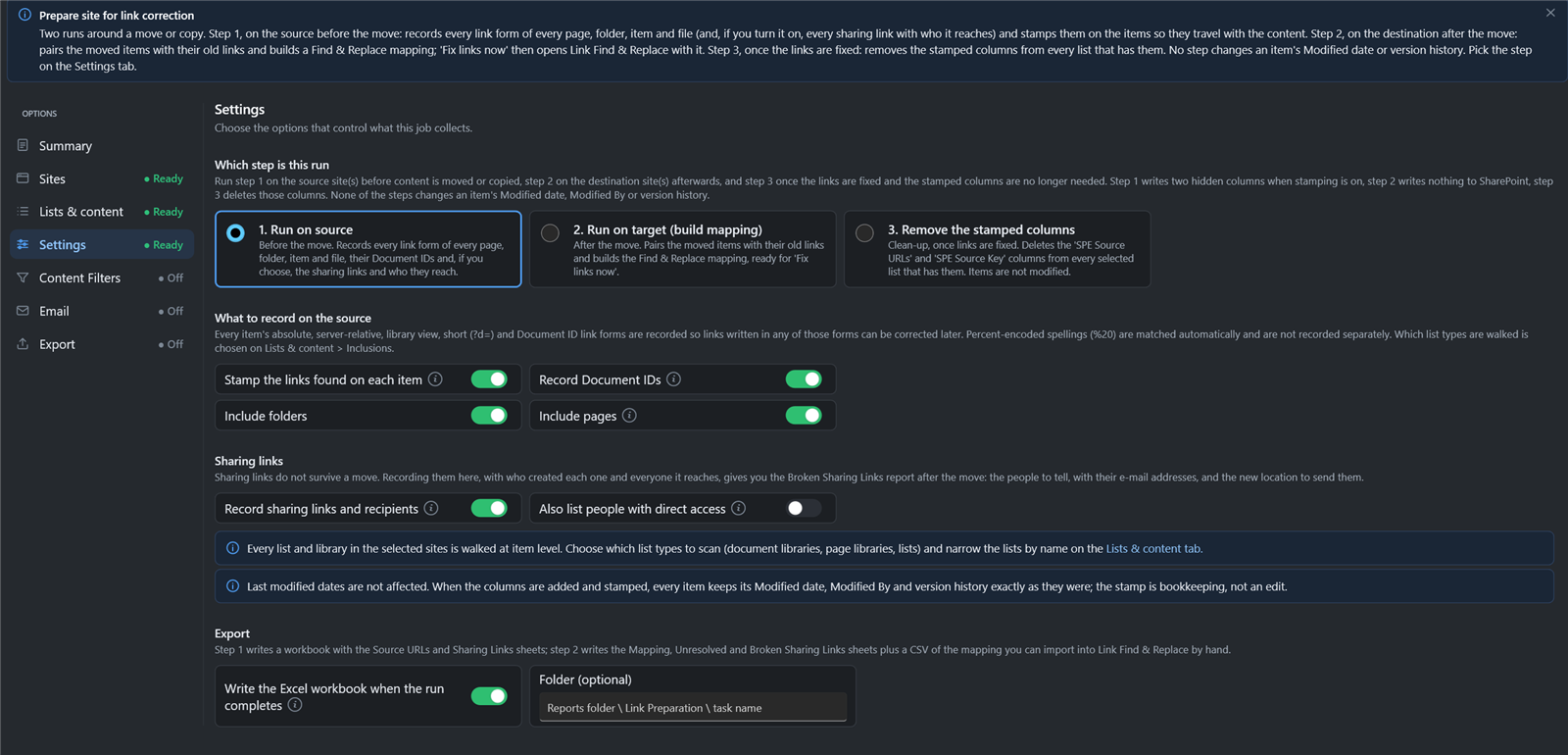
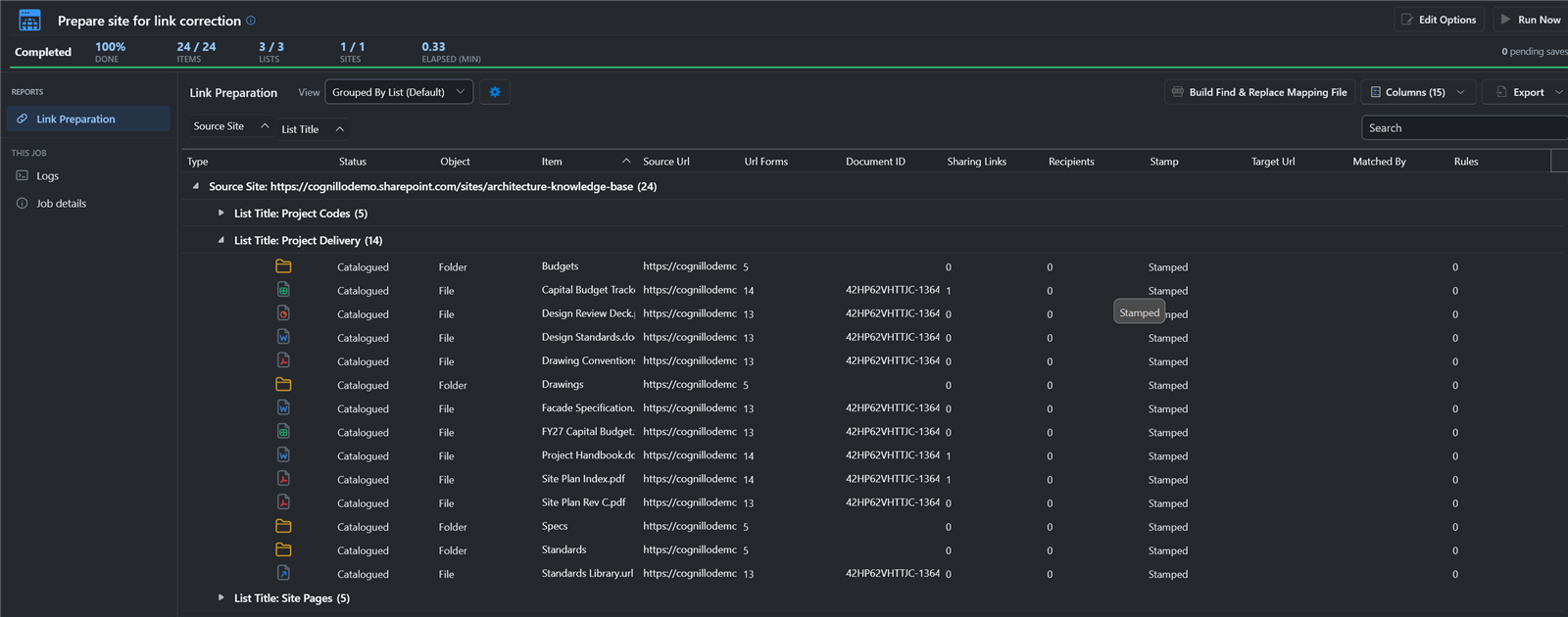
Before the move, run Prepare site for link correction with 1. Run on source. For every item, folder, page and file, it records each form of its address (absolute, server-relative, library view, short and Document ID) and stamps them into two hidden columns, SPE Source URLs and SPE Source Key. Turn on Record sharing links and recipients to keep a list of every sharing link and who it reaches.
Stamping doesn't change an item's Modified date, Modified By or version history.
2. Copy the content, with any tool
The stamps are ordinary column values, so any copy that carries metadata brings them along. We used the toolkit's Copy sites, which keeps item IDs, versions and authors through the Migration API. ShareGate, Fly or Content Matrix would carry the stamps the same way, so you can keep the migration tool you already pay for and still fix the links inside files.
3. Find the broken links on the target
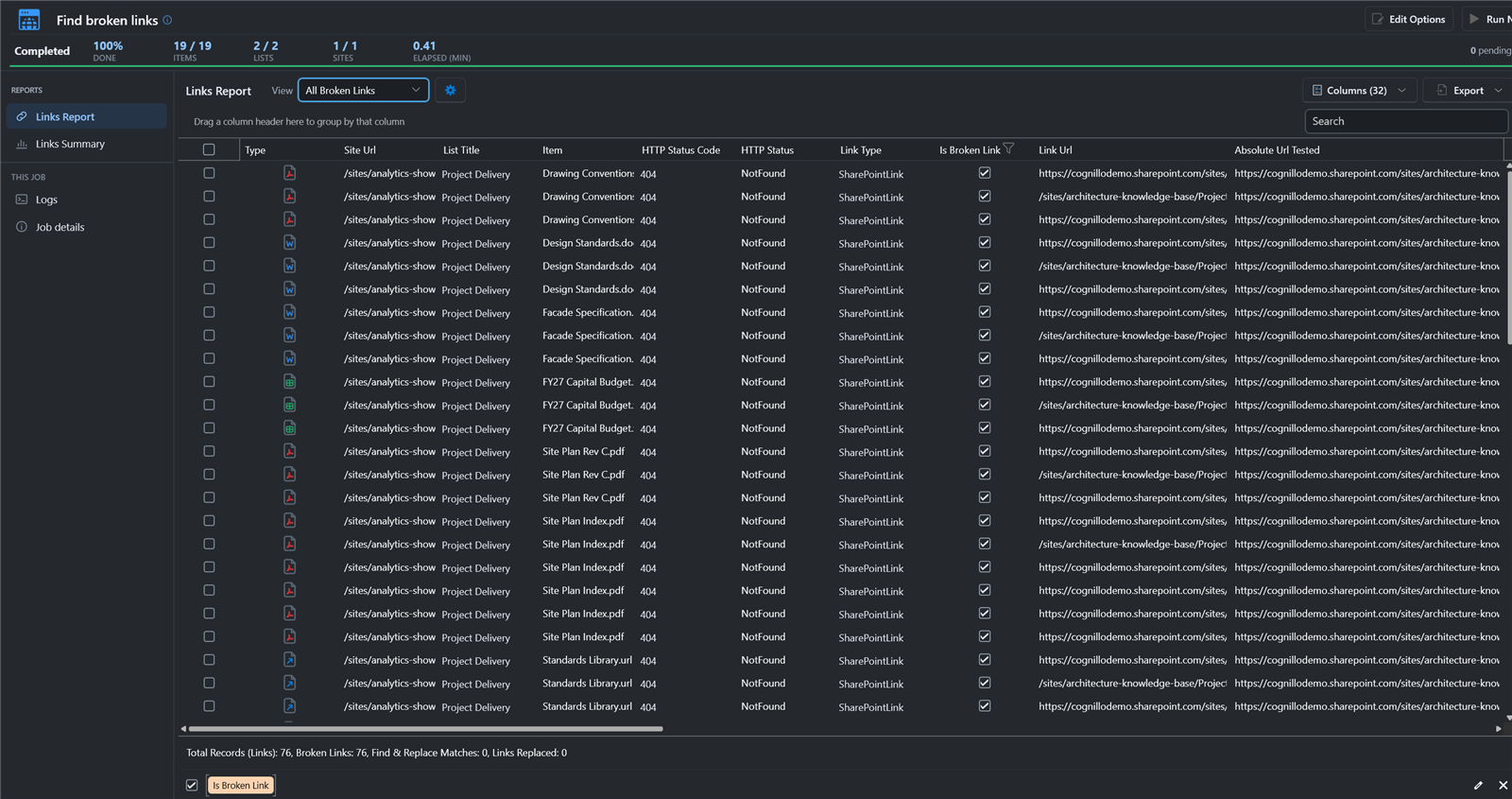
Run Find broken links on the target site. Every link in the moved files still pointed at the old site and returned 404.
4. Build the mapping on the target
Run Prepare site for link correction again on the target, with 2. Run on target (build mapping). It reads the stamps, pairs each moved item with its old addresses, and adds site, list and folder prefix rules for anything not stamped. It writes nothing to SharePoint.
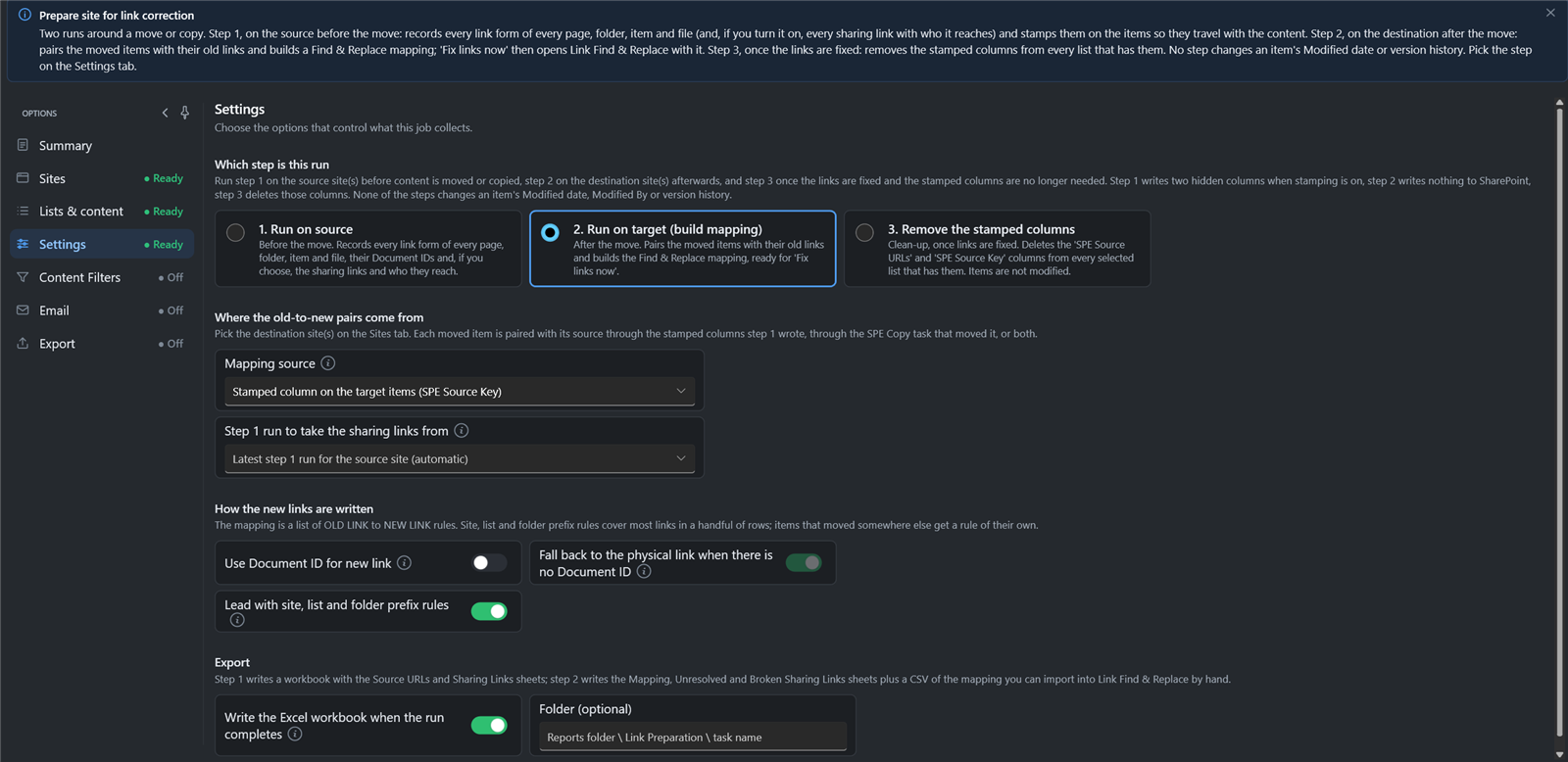
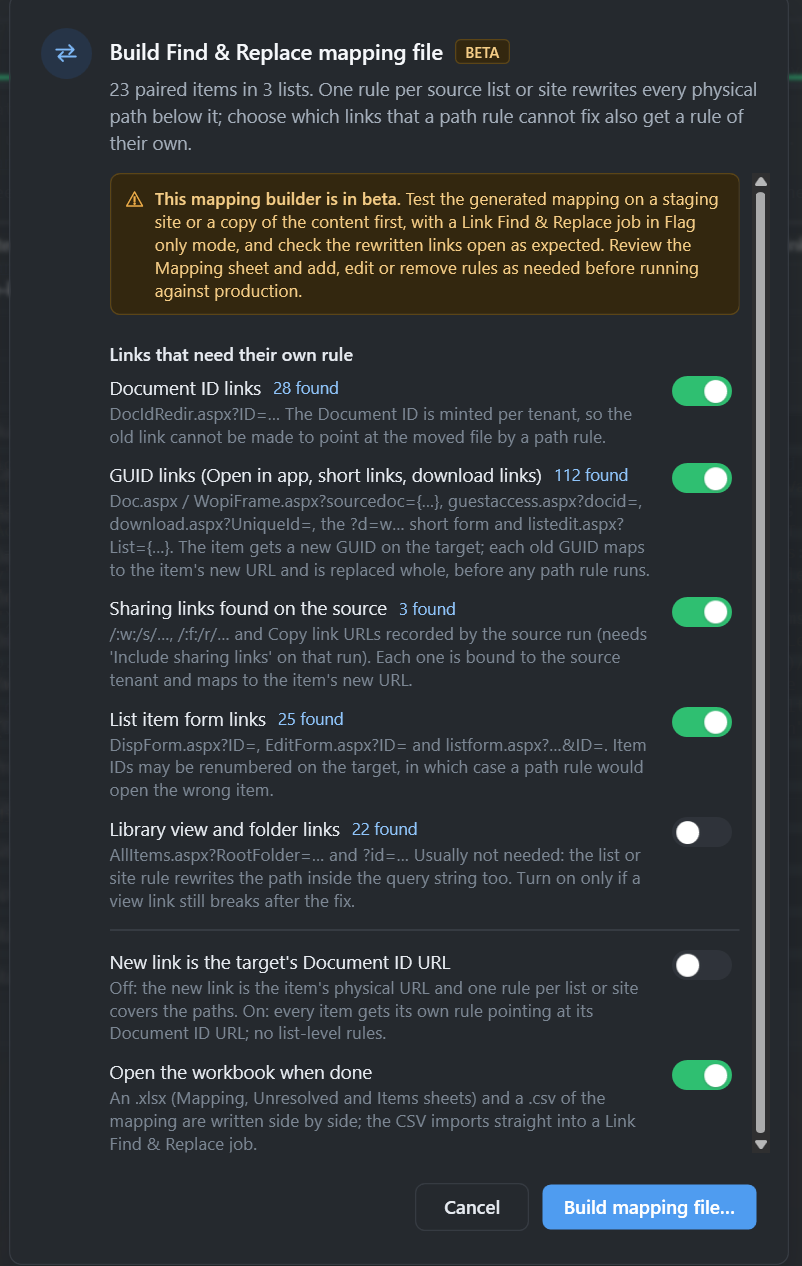
Then Build Find & Replace mapping file. Ours paired 23 items across 3 lists and wrote 282 rules: 28 for Document ID links, 112 for GUID links, 3 for sharing links and 25 for list item form links, plus the path rules. The rules go to an Excel workbook and a CSV file you can review or edit.
5. Preview the fix
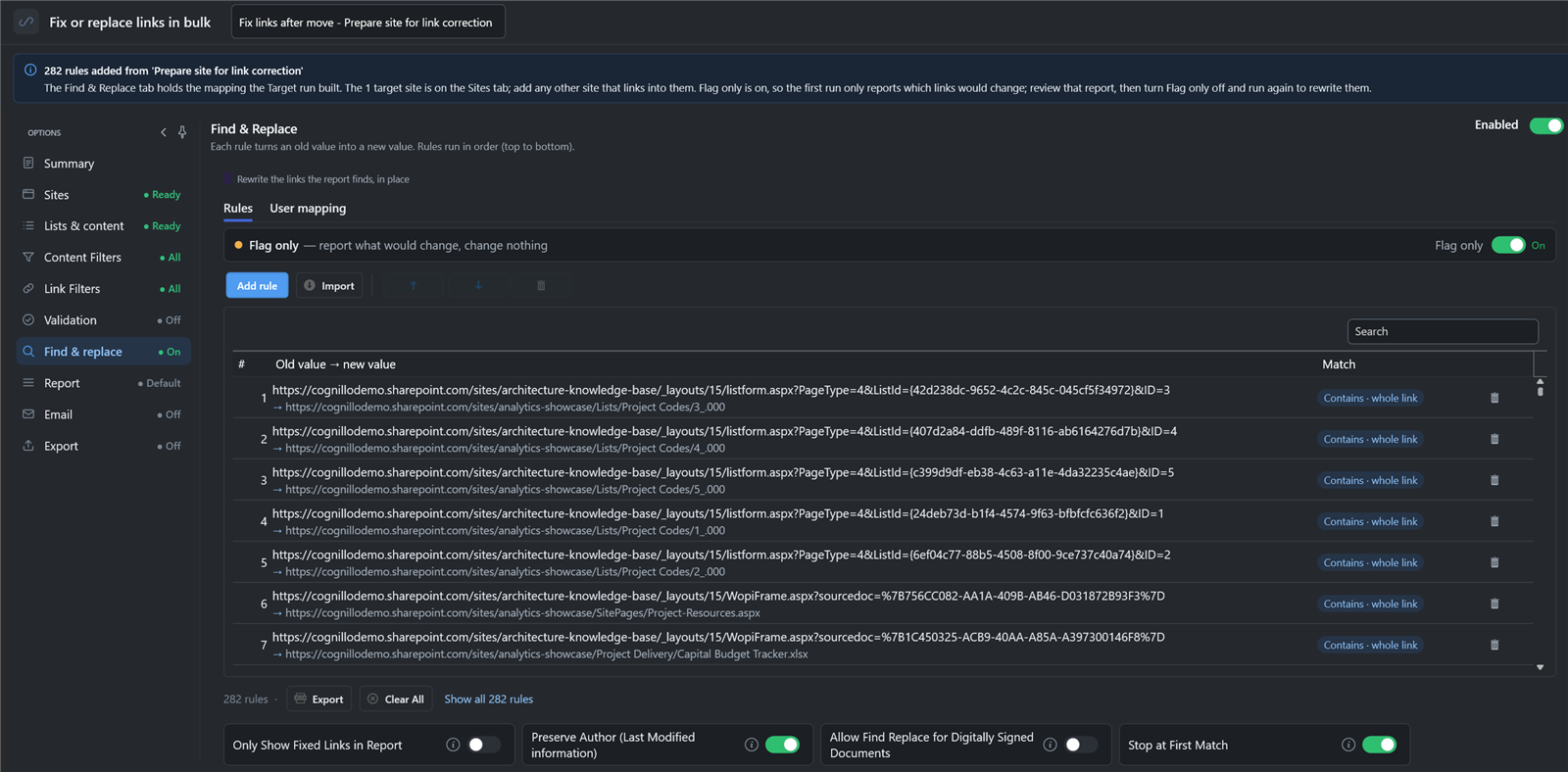
Click Fix links now. It opens Fix or replace links in bulk with the 282 rules loaded and Flag only on, so the first run changes nothing. Preserve Author keeps each file's Modified By and Modified date.
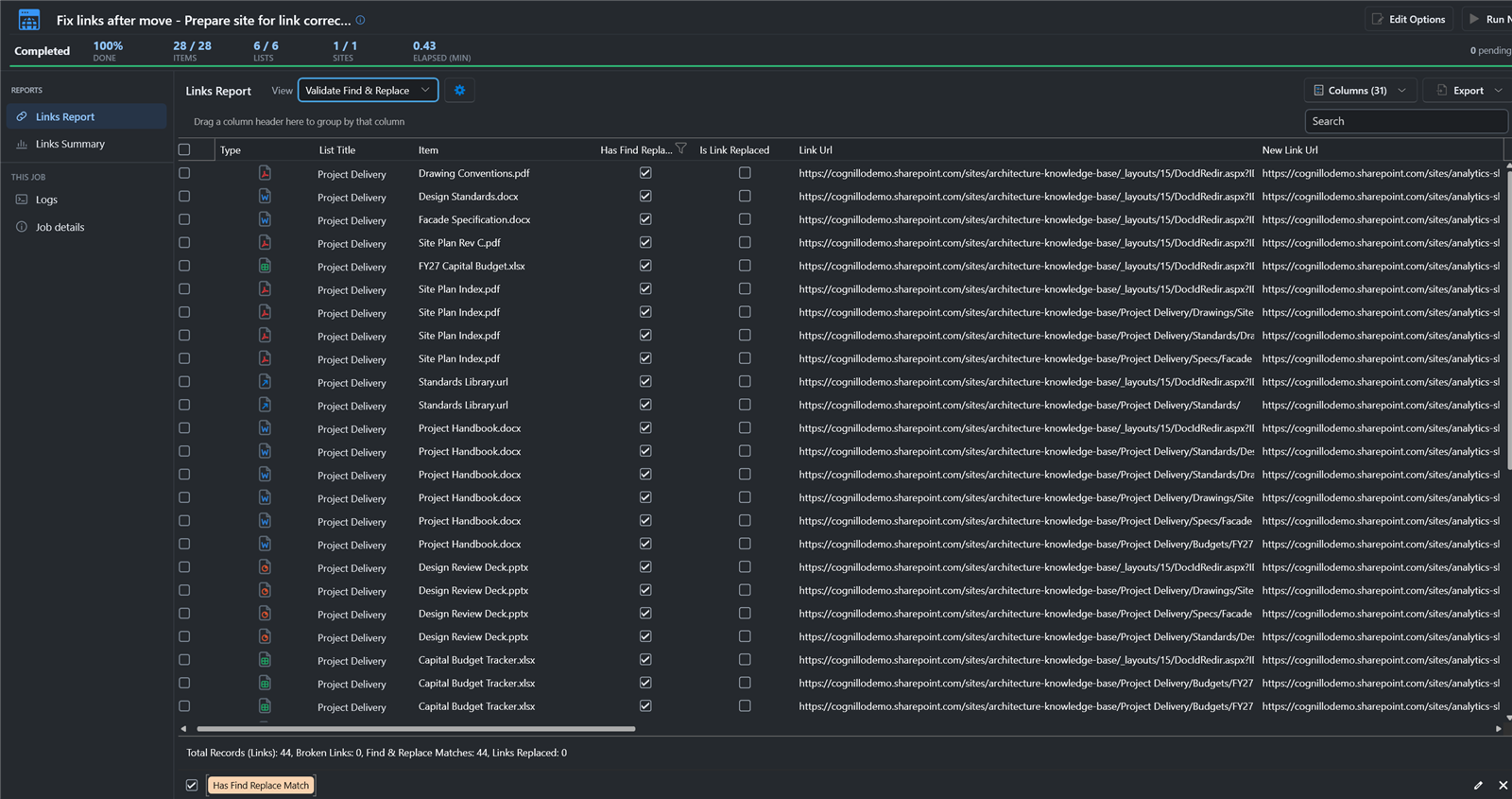
The preview found 44 links to replace and replaced none. Each row shows the file, the old link and the new one, so you can check the mapping before anything is written.
6. Replace the links
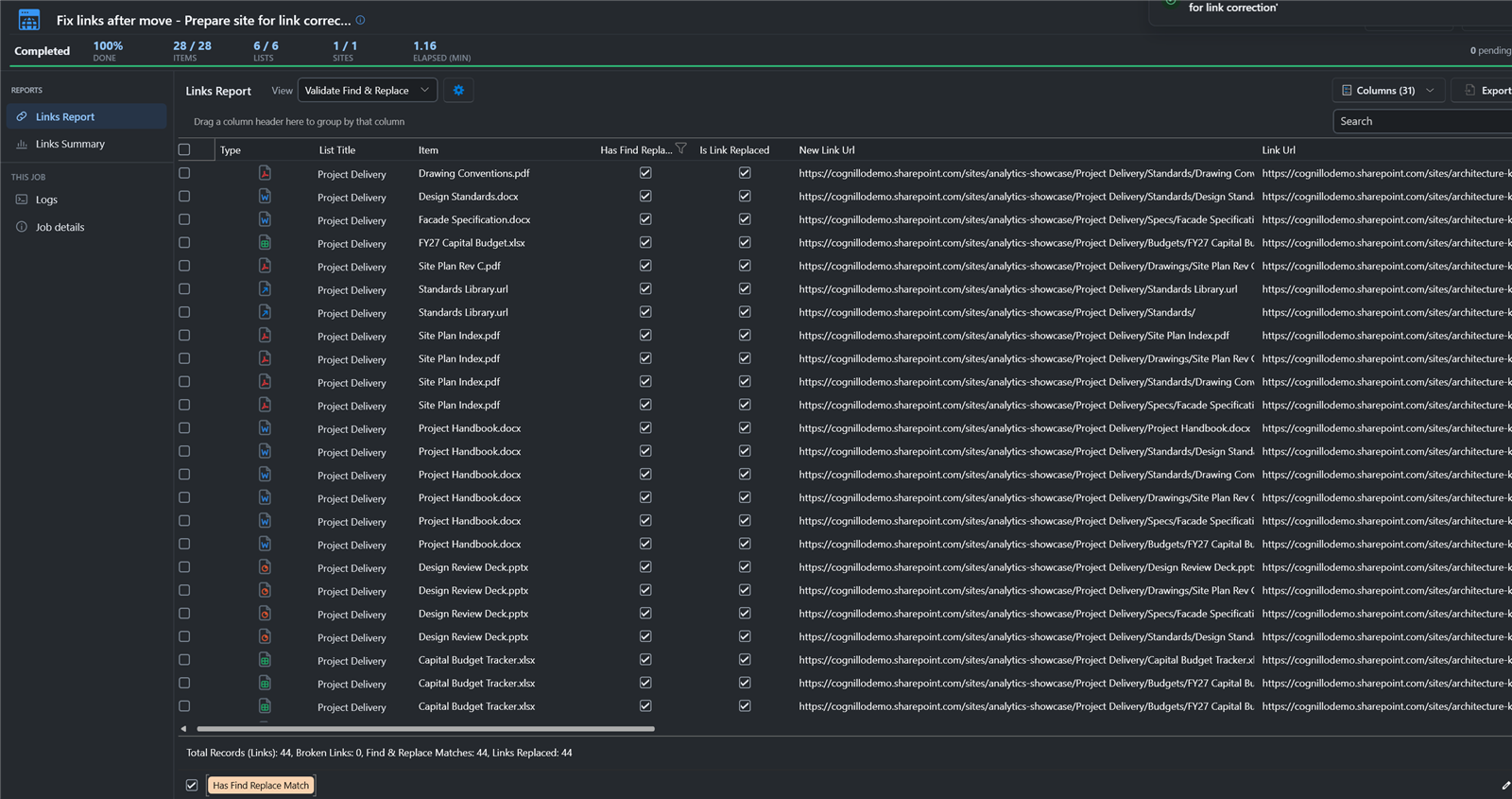
Turn off Flag only and run again. All 44 links were rewritten in place, inside the Word, Excel and PowerPoint files, the PDFs, the .url shortcuts and the pages.
7. Check again
Rerun Find broken links. Two remained, both expected: a page link to a list we chose not to migrate, and a Quick Launch link that was already broken on the site before the move.

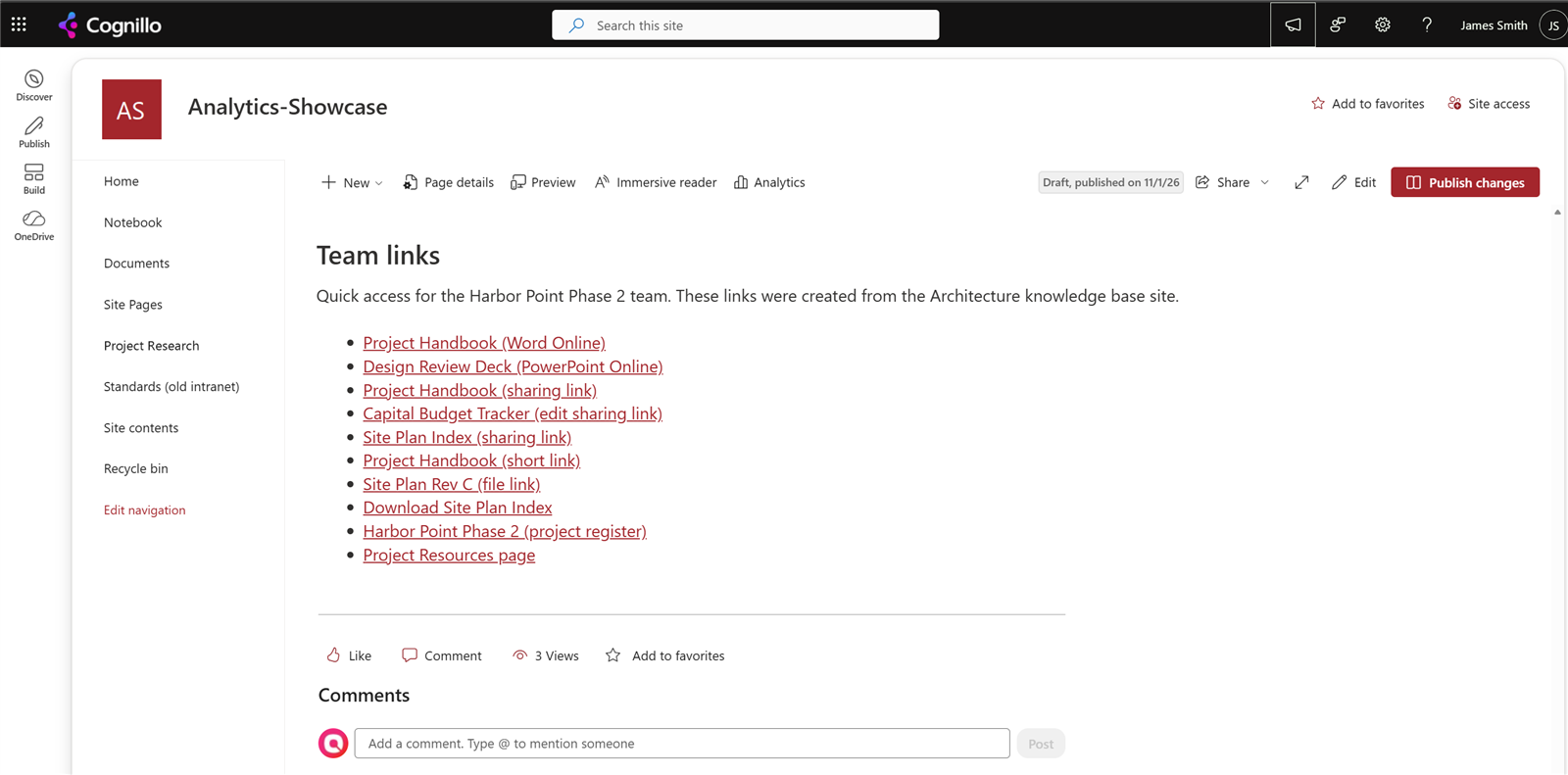
The links page on the target now opens the moved files.
8. Remove the stamps
Run the task a third time with 3. Remove the stamped columns. It deletes SPE Source URLs and SPE Source Key from every selected list that has them, without changing the items' Modified dates.
Benefits over other migration tools
- Links inside files. The tools above stop at pages, columns and navigation. The toolkit opens Office files, PDFs, shortcuts and text files and rewrites the links in place, and Preserve Author keeps Modified By and Modified unchanged.
- Works after any migration tool. The stamps travel as column values, so the fix runs on content moved by ShareGate, Fly, Content Matrix or the toolkit itself.
- Document ID, GUID and sharing links. These can't be fixed by swapping one path for another. Recording them on the source is what makes a rule possible on the target.
- The people a sharing link reached. The Broken Sharing Links sheet lists who received each link, with their email addresses and the new location to send them.
- Preview first. Flag only shows every replacement before anything is written, and the rules are a CSV file you can edit.
- Proof. The broken links report runs before and after, so you can show what was fixed and what's left.
- Free to start. Preparing the source, the mapping and the broken links report are free in Community Edition, and Fix or replace links runs free on lists of up to 100 items. Fixing larger lists needs Enterprise.
Which SharePoint migration tool should you use?
- SharePoint Server 2010 to 2019 to SharePoint Online, few cross-links: SPMT, free.
- File shares or cloud drives: Migration Manager, free.
- SharePoint Online to SharePoint Online, or to another tenant, on up to 20 sites: SharePoint Essentials Toolkit Community Edition, free, with link correction around it.
- Large projects that also move Teams, mailboxes or Google Workspace: a paid suite such as ShareGate, Fly or Content Matrix. Run the toolkit's Prepare step on the source before you start, so the links inside files can be fixed afterward.
Planning the move? See the SharePoint migration checklist and how to find broken links in SharePoint.
Frequently asked questions
Which SharePoint migration tools fix links inside documents?
Few do. ShareGate's help says it does not manipulate the content of documents, Quest's knowledge base says Content Matrix does not support link correction inside any documents, and AvePoint lists URLs in Office and other files as unsupported for Fly URL mappings. SharePoint Essentials Toolkit rewrites links inside Word, Excel, PowerPoint, Visio, OneNote, PDF, .url and text files, as well as in pages and columns.
Do I have to migrate with SharePoint Essentials Toolkit to use its link correction?
No. Prepare site for link correction stamps each item's old addresses into two hidden columns on the source. Any tool that carries column values across, including SharePoint Essentials Toolkit, ShareGate, AvePoint Fly or Content Matrix, brings the stamps with the content, and the toolkit builds the old-to-new mapping from them on the target.
What happens to Document ID and sharing links after a SharePoint migration?
They usually break. A Document ID is issued by the target site collection, so the old ID no longer resolves, and sharing links are tied to the original file. SharePoint Essentials Toolkit records Document IDs and sharing links on the source, then writes rules that replace them with the moved file's address and lists the people each sharing link reached.
Is there a free SharePoint to SharePoint Online migration tool?
Yes. SharePoint Essentials Toolkit Community Edition copies sites and lists between SharePoint Online sites and tenants free on up to 20 site collections per tenant, through the Microsoft Migration API, with versions, authors, dates and permissions. Microsoft's free SPMT and Migration Manager do not accept SharePoint Online as a source.
Is link correction free in SharePoint Essentials Toolkit?
Preparing the source, building the mapping and the broken links report are free in Community Edition. Fix or replace links runs free on lists of up to 100 items, which is enough to test it on your own content. Rewriting links across larger lists needs Enterprise.
Does Microsoft's cross-tenant migration fix links?
It doesn't rewrite them. Cross-tenant SharePoint migration leaves a redirect site at the old address, so old links and sharing links forward to the new site while that redirect and the source tenant exist. Links inside files keep the old address.
Fix the links your migration tool leaves behind
SharePoint Essentials Toolkit Community Edition is free. Prepare your sites for link correction, copy sites with versions and permissions, find broken links and test the fix on your own content, on up to 20 sites per Microsoft 365 tenant. Get your free Community Edition license key.