SharePoint Online Throttling (429 and 503): Why It Happens, How Retry-After Works, and Scripts That Don't Get Blocked
SharePoint Online returns 429 Too Many Requests (or 503 Server Too Busy) when one user or app sends more requests than it allows in a time window, and includes a Retry-After header saying how many seconds to wait. Wait that long and retry; retrying sooner extends the block. Then send fewer requests: select only the fields you need, page large lists, batch updates, run outside business hours, use app-only with a certificate, and decorate traffic with a User-Agent.
Published:
Last updated: 2026-10-29
What throttling looks like
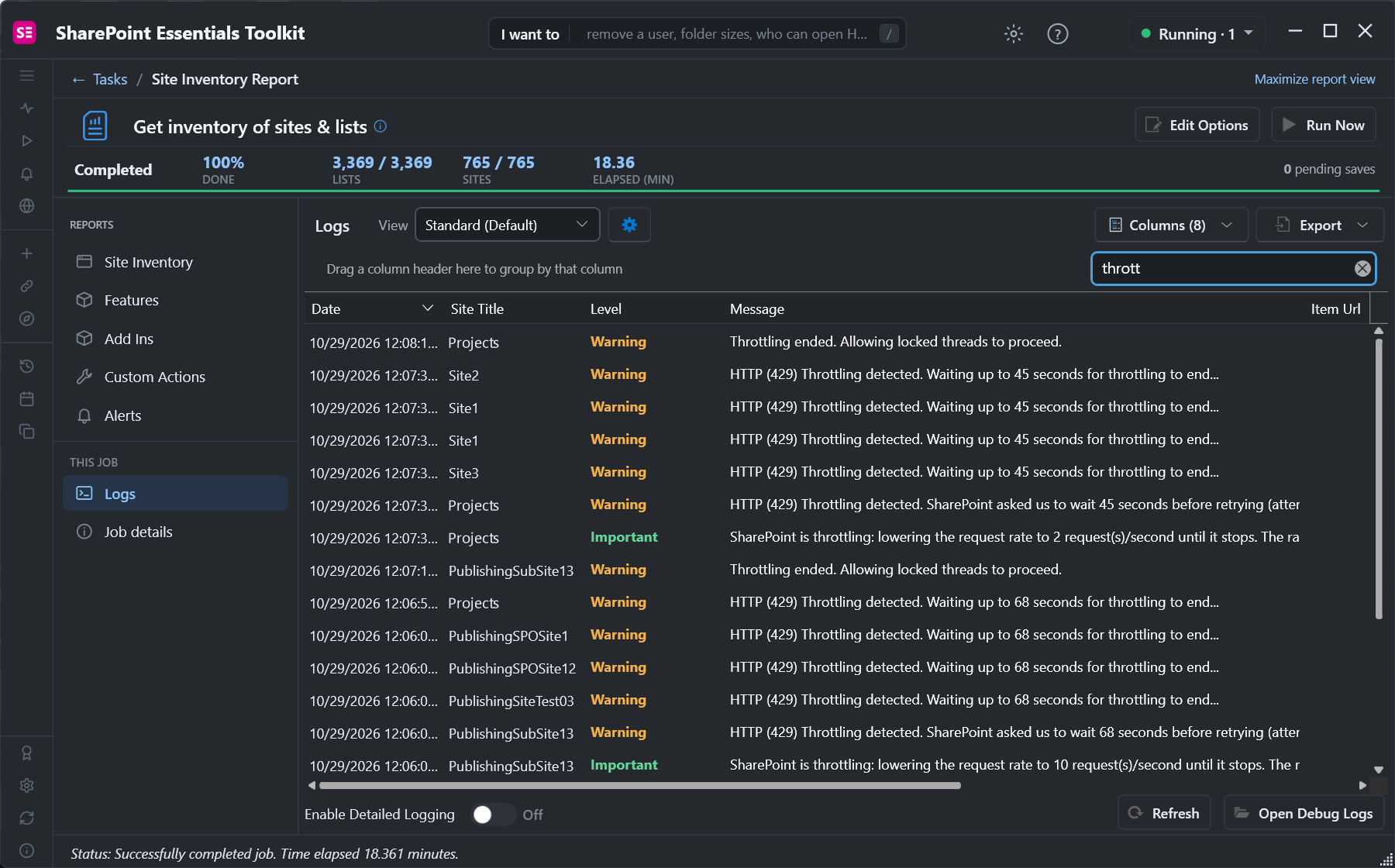
During a toolkit inventory of 765 sites and 3,369 lists, SharePoint throttled us several times. The log shows what SharePoint said each time:
- 429 Too Many Requests: you, as a user or an app, sent too much in a short window.
- 503 Server Too Busy: the service is under load; it's also throttling and also carries Retry-After.
- Retry-After: seconds to wait. Our waits were 45 and 68 seconds; they can be longer.
- Retrying before Retry-After has passed counts against you and makes the block longer. Repeated heavy throttling can end in the app or user being blocked for longer periods.
Limits aren't published as fixed numbers. They're per user and per app, per tenant, and depend on time of day and the cost of each request. A query that scans a large list costs more than one that reads an item by ID.
Option 1: Reduce load without code changes
- Run big jobs outside business hours in the tenant's region. Limits are tighter when users are active.
- Split the work. One script per site collection, run one after another, rather than many in parallel under the same account.
- Don't run several heavy tools at once with the same account or app; they share its limit.
- Check the SharePoint admin center, Reports, and Microsoft 365 service health, if throttling starts suddenly. 503s during an incident aren't your script.
Option 2: Make PowerShell scripts throttle-safe
Honor Retry-After
PnP PowerShell already retries CSOM requests (most Get-PnP* and Set-PnP* cmdlets) with backoff. Your own REST and Graph calls don't. This wrapper retries 429 and 503, waits exactly as long as Retry-After says, and gives up after a few tries:
function Invoke-SPWithRetry {
    param([scriptblock]$Request, [int]$MaxRetries = 6)
    for ($try = 1; ; $try++) {
        try { return & $Request }
        catch {
            $resp = $_.Exception.Response
            $code = if ($resp) { [int]$resp.StatusCode } else { 0 }
            if ($code -notin 429, 503 -or $try -gt $MaxRetries) { throw }
            $wait = 0
            $ra = $resp.Headers | Where-Object { $_.Key -eq "Retry-After" } | Select-Object -First 1
            if ($ra) { $wait = [int]($ra.Value | Select-Object -First 1) }
            if ($wait -le 0) { $wait = [math]::Min(300, [math]::Pow(2, $try) * 5) }   # no header: back off
            Write-Warning ("HTTP {0}; waiting {1}s (attempt {2} of {3})" -f $code, $wait, $try, $MaxRetries)
            Start-Sleep -Seconds $wait
        }
    }
}

# Example: a REST call with a decorated User-Agent
$headers = @{ Authorization = "Bearer $token"; Accept = "application/json;odata=nometadata"
              "User-Agent" = "NONISV|Contoso|SiteReport/1.0" }
$web = Invoke-SPWithRetry { Invoke-RestMethod -Uri "$SiteUrl/_api/web?`$select=Title" -Headers $headers }
This uses PowerShell 7's HttpResponseMessage headers. For a PnP connection, get the token with Get-PnPAccessToken -ResourceTypeName SharePoint, or call Invoke-PnPSPRestMethod inside the wrapper.
Send fewer, cheaper requests
| Instead of | Do |
|---|---|
Get-PnPListItem -List $l (every field) | -Fields Title, Modified -PageSize 2000 |
| One update per item | New-PnPBatch / Invoke-PnPBatch, 100 operations per request |
| Reading everything again each run | Only items modified since the last run (CAML on Modified, or Graph delta) |
Loops of Get-PnPProperty per item | Load the property in the first query with -Includes where the cmdlet supports it |
| Many parallel threads | 2 to 4 at most per account, slowed down when a 429 arrives |
| Delegated sign-in for big jobs | App-only with a certificate, which has its own limits apart from the user's (how to set it up) |
Microsoft asks that apps decorate traffic with a User-Agent in the form NONISV|CompanyName|AppName/Version (or ISV|... for vendors). Decorated traffic is prioritized over undecorated traffic when throttling decisions are made.
For storage cleanups, prefer server-side jobs such as New-SPOSiteFileVersionBatchDeleteJob over per-file loops; see bulk deleting old versions.
Option 3: Let SharePoint Essentials Toolkit handle it
The toolkit applies all of this to its own requests. When SharePoint returns 429 or 503, it reads Retry-After, holds every thread for that long, and lowers its request rate until throttling stops. The status bar says what's happening while you wait:
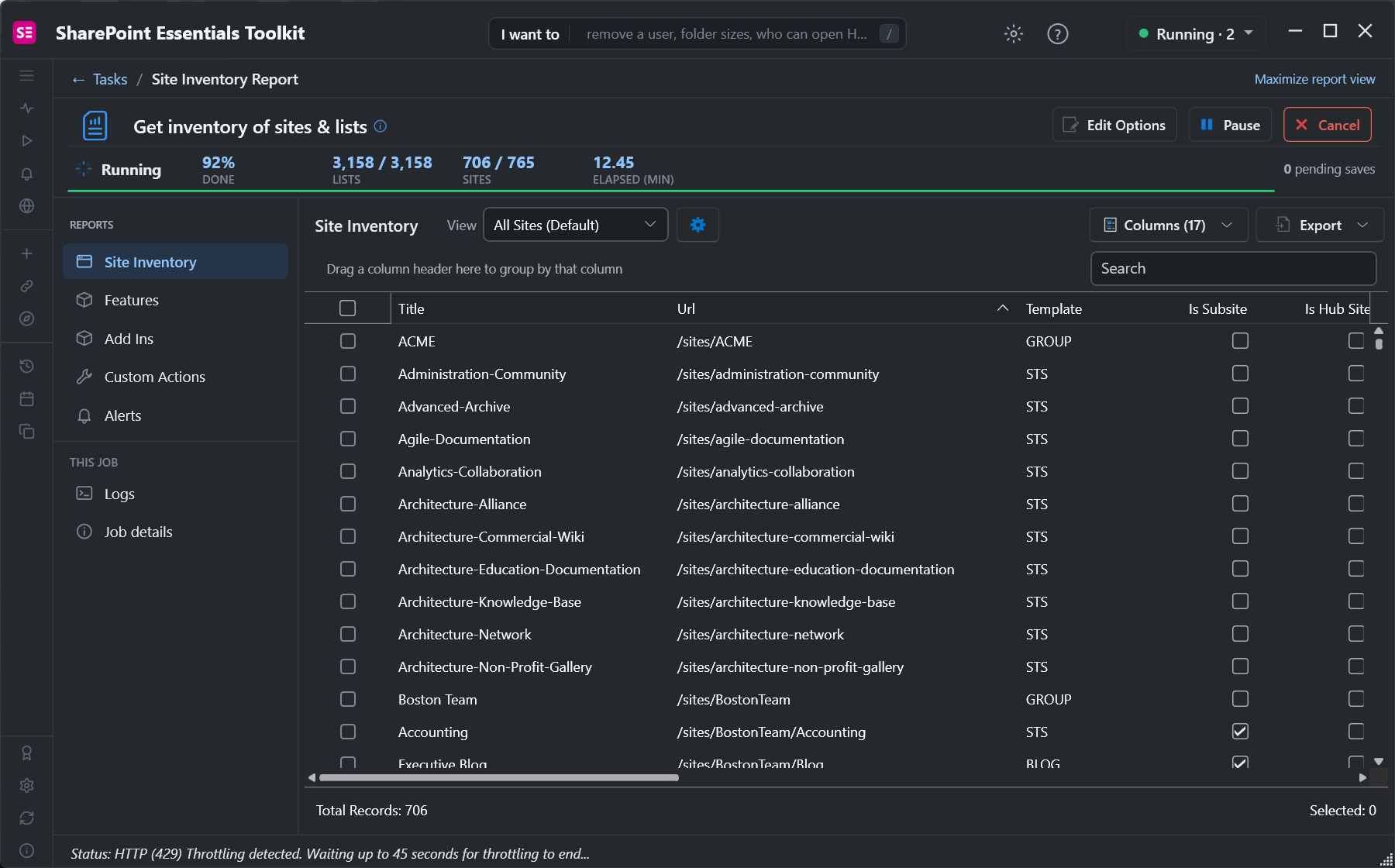
Our 765-site inventory finished in 18 minutes with throttling included, and nothing had to be re-run. Every throttling event is in the job's Logs, so you can see when SharePoint pushed back and plan large jobs for quieter hours, or schedule them.
Frequently asked questions
What does 429 Too Many Requests mean in SharePoint Online?
SharePoint is throttling you: your user or app sent more requests than it allows in a time window. The response has a Retry-After header with the number of seconds to wait before retrying.
How long does SharePoint throttling last?
As long as Retry-After says, often seconds to a couple of minutes; we saw 45 and 68 seconds. Retrying early makes it longer, and sustained heavy traffic can lead to longer blocks.
Does PnP PowerShell handle SharePoint throttling?
For CSOM-based cmdlets, yes; it retries with backoff. Your own Invoke-RestMethod or Graph calls need a retry wrapper that reads Retry-After.
Is 503 Server Too Busy also throttling?
Usually, yes. SharePoint returns 503 with Retry-After when the service is under load. Treat it like a 429. During a service incident, check Microsoft 365 service health.
How do I avoid SharePoint throttling in large scripts?
Select only needed fields, page large lists, batch updates, limit parallel threads, run outside business hours, use app-only with a certificate, and set a User-Agent like NONISV|Company|App/1.0.
Run large SharePoint reports without fighting throttling, free
SharePoint Essentials Toolkit Community Edition is free. Inventory, permissions and storage reports wait out throttling for you and log every event, on up to 20 sites per Microsoft 365 tenant. Get your free Community Edition license key.